The Writing App That Needs Nothing From You
You open your phone. You want to write something — a quick draft, a job application, a few paragraphs for a project you’ve been putting off. You tap the writing app.
Then: Sign in to continue.
Or: Your file is syncing…
Or worse: This feature requires a subscription.
It’s 2026 and somehow, writing a document on your own phone has become a permission process. Your words, stored in someone else’s servers, governed by someone else’s pricing model, accessible only when your Wi-Fi cooperates.
There’s a growing, quiet countermovement to this. It doesn’t have a manifesto. It just has a principle: your documents should live on your device, work without internet, and never require an account to open.
“The best tool for deep work is one that gets out of the way. No notifications, no sync failures, no paywalls mid-sentence.”
This is the case for offline word processing on Android — and why more writers, students, and professionals are quietly making the switch.
Why Cloud-Based Writing Apps Work Against You
Cloud document apps were designed for collaboration and convenience. If you’re a team of ten working on the same report in real time, Google Docs is genuinely impressive.
But most people aren’t doing that. Most people are:
- Writing a resume at 11 PM before a deadline
- Drafting a letter on their commute with spotty signal
- Working on a personal project they don’t want stored on a corporate server
- Just trying to type something without being interrupted by a loading spinner
For these use cases, cloud dependency is pure friction. And friction, as any behavioral psychologist will tell you, is the enemy of consistency.
There’s also the data question. When your documents live in the cloud, they live under the terms of service of whoever owns that cloud. They can be subpoenaed, scanned for ads, or simply lost when a company shuts down a product. Digital privacy advocates have been raising this flag for years — and people are finally listening.
What “Offline-First” Actually Means for Writers
Offline-first doesn’t mean “technophobe.” It means the app treats your local device as the source of truth — not a server in Virginia.
In practice, this means:
- Instant launch — no loading, no sync check, no authentication handshake
- Full functionality without Wi-Fi — write, format, export, even scan documents
- No account required — your files aren’t tied to a login that could be revoked
- Privacy by architecture — there’s nothing to leak because nothing leaves your phone
This isn’t a trade-off. For most writing tasks, it’s strictly better.
The Android Word Processor Gap Nobody Talks About
Here’s something surprising: Android has over 3 billion active users. Yet the landscape of genuinely offline, full-featured word processors for Android is remarkably thin.
Most options fall into one of these traps:
| App Type | The Catch |
|---|---|
| Google Docs | Requires Google account, syncs to cloud by default |
| Microsoft Word (mobile) | Core features locked behind Microsoft 365 subscription |
| WPS Office | Aggressive ads, account upsell, data collection |
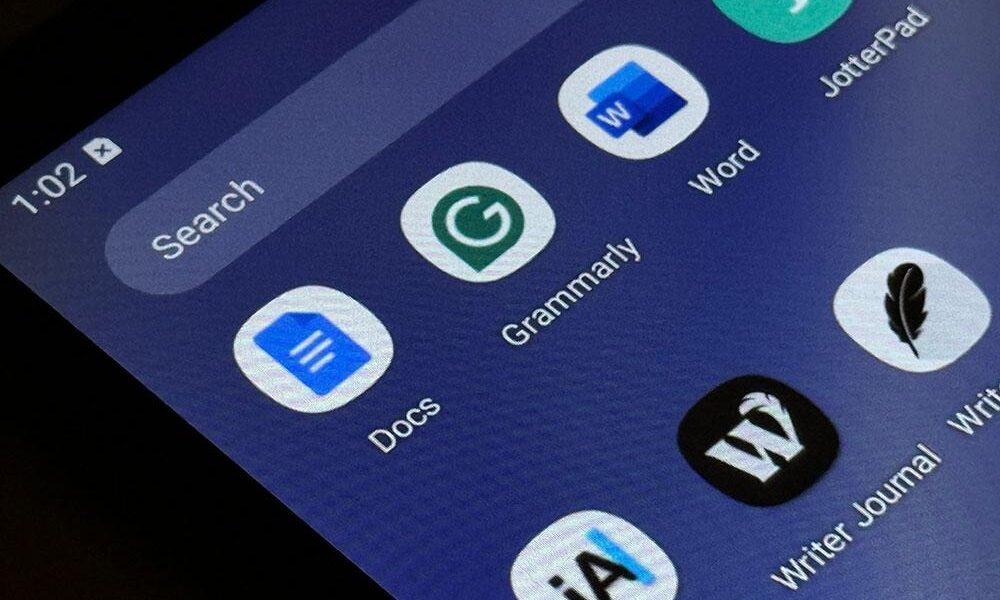
| Random text editors | No rich text, no export, can’t open .docx files |
This is the gap that matters. Not “offline mode” as a feature tacked onto a cloud app — but an app that was designed from the ground up to work without the internet.
Apps like Wordpad Plus represent a different philosophy entirely: a full-featured Android word processor that requires zero accounts, collects zero data, and works completely offline — while still supporting rich text formatting, .docx import, PDF export, OCR scanning, and document signing.
Five Writing Scenarios Where Offline Always Wins
1. The Commuter Draft
Underground subway. No signal. You have 40 minutes and an idea. Offline apps don’t care about your signal. They just open.
2. The Privacy-Critical Document
Medical notes. Legal correspondence. Personal diary entries. Financial planning. These are documents you probably don’t want auto-synced to a server. Offline storage is the simplest privacy solution.
3. The Student on a Budget
A Microsoft 365 subscription costs thousands of rupees per year. Google Docs is free but monetized through your data. A one-time offline word processor with no subscription means your study materials stay yours, forever.
4. The International Traveler
Roaming data is expensive. Airport Wi-Fi is unreliable. Having a full word processor that works on your device — no connectivity required — is genuinely practical, not just philosophical.
5. The Focused Writer
There’s research showing that reducing digital friction and notifications improves sustained attention. An offline writing app is, by design, a distraction-reduced writing environment. No sync banners. No “update available.” Just the document.
What to Look For in an Android Word Processor
Not all offline apps are equal. Here’s a framework for evaluating them:
- True offline capability — Does it work with airplane mode on, from first launch?
- Format support — Can it open and export .docx and PDF? These are the universal formats.
- Rich text formatting — Bold, italic, headings, lists, alignment. Basic but essential.
- Document management — Folders, search, recycle bin. Your files should be organized.
- No mandatory account — The app should work the moment you install it.
- Privacy policy clarity — Does the app explicitly state it collects no data?
These criteria eliminate most options quickly. The few apps that meet all six tend to be purpose-built indie tools rather than scaled enterprise software — which, ironically, makes them better for individual users.
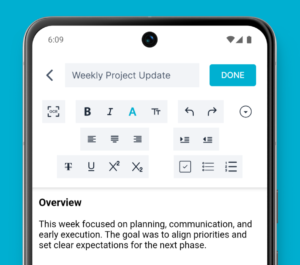
A simpler way to write on Android
If you want a word processor that opens instantly, works without Wi-Fi, and never asks for your Google account, Wordpad Plus is built around exactly that idea. It’s an offline-first Android document editor with rich text formatting, PDF export, OCR scanning, and zero data collection — used by over 100,000 people who’d rather just write.
The Bigger Shift: Ownership Over Convenience
There’s a cultural shift happening quietly among mobile users. After years of “free” apps that monetized attention and data, people are starting to ask a different question: what do I actually own here?
Your documents are an extension of your thinking. They contain your ideas, your plans, your creative work. The question of where they live — on your device or on someone else’s server — is not a technical detail. It’s a question of ownership.
Offline-first writing apps answer that question clearly. Your words. Your device. Your control.
Frequently Asked Questions
Can I use an offline word processor to open Microsoft Word files on Android?
Yes. Quality offline word processors for Android support .docx import and export, so you can work with Word files without ever opening Microsoft Word or paying for a subscription. Look for apps that explicitly list .docx compatibility.
Is writing offline on Android actually better for productivity?
For focused, solo writing tasks — yes. Eliminating sync delays, login prompts, and notification interruptions creates a cleaner writing environment. Research on cognitive load and focus suggests that reducing digital friction meaningfully improves sustained attention.
Are offline Android word processors safe for sensitive documents?
They’re significantly safer than cloud alternatives for sensitive content. If an app is fully offline with no data collection, your documents never leave your device. Look for apps with PIN lock and clear privacy policies that state zero data collection.
What’s the best free offline word processor for Android in 2026?
The best option depends on your needs, but key features to prioritize are: true offline operation, .docx support, PDF export, no mandatory account, and a clear no-data-collection policy. Apps with 100K+ downloads and strong ratings (4.0+) on Google Play are generally reliable picks.
Can I export to PDF from an offline Android word processor?
Yes — good offline word processors include PDF export as a core feature, not a premium add-on. This is especially useful for sharing documents professionally without requiring the recipient to have any specific app installed.