The obvious way to track a personal project is to break it into every task it will ever need and check them off in order. Forty-one rows for the bathroom. Twenty-six for the bike. A chapter-by-chapter plan for the book. It feels like the responsible version, and for a solo project it is the thing that goes stale fastest.
Here is what actually happens. You work on it for two weekends, then something else takes over for three weeks. You open the list again and every row on it is still accurate — and still useless. It tells you everything that must eventually happen. It does not tell you that you had already chosen the satin finish and rejected the gloss for a reason you can no longer remember, that you were waiting on a part from a seller who never replied, or which of the twelve open rows was the one holding up the other eleven.
A personal project doesn’t fail at the task list. It fails at the gap. And the expensive thing a gap takes isn’t momentum — it’s state.
What the gap actually costs
Come back to a project after three weeks away and the first twenty to forty minutes go on reconstruction. Not work — reading. You walk around the half-finished thing, open the drawer of receipts, scroll your own browser history, and try to recover what your past self knew.
Most of that time goes on re-deciding things you already decided. You spent an hour comparing two kinds of grout, picked one, and did not write down which. Three weeks later you spend most of that hour again and usually land in the same place. Nothing was gained; an hour was spent twice.
That reconstruction isn’t the thing you sat down to do. You came to sand a drawer front or practise a chord change, and instead you’re doing forensics on yourself. Twenty minutes of that and the evening is gone.
Which means the job of the record is narrower than a plan. It has to make the restart cheap.
The fields that survive a gap
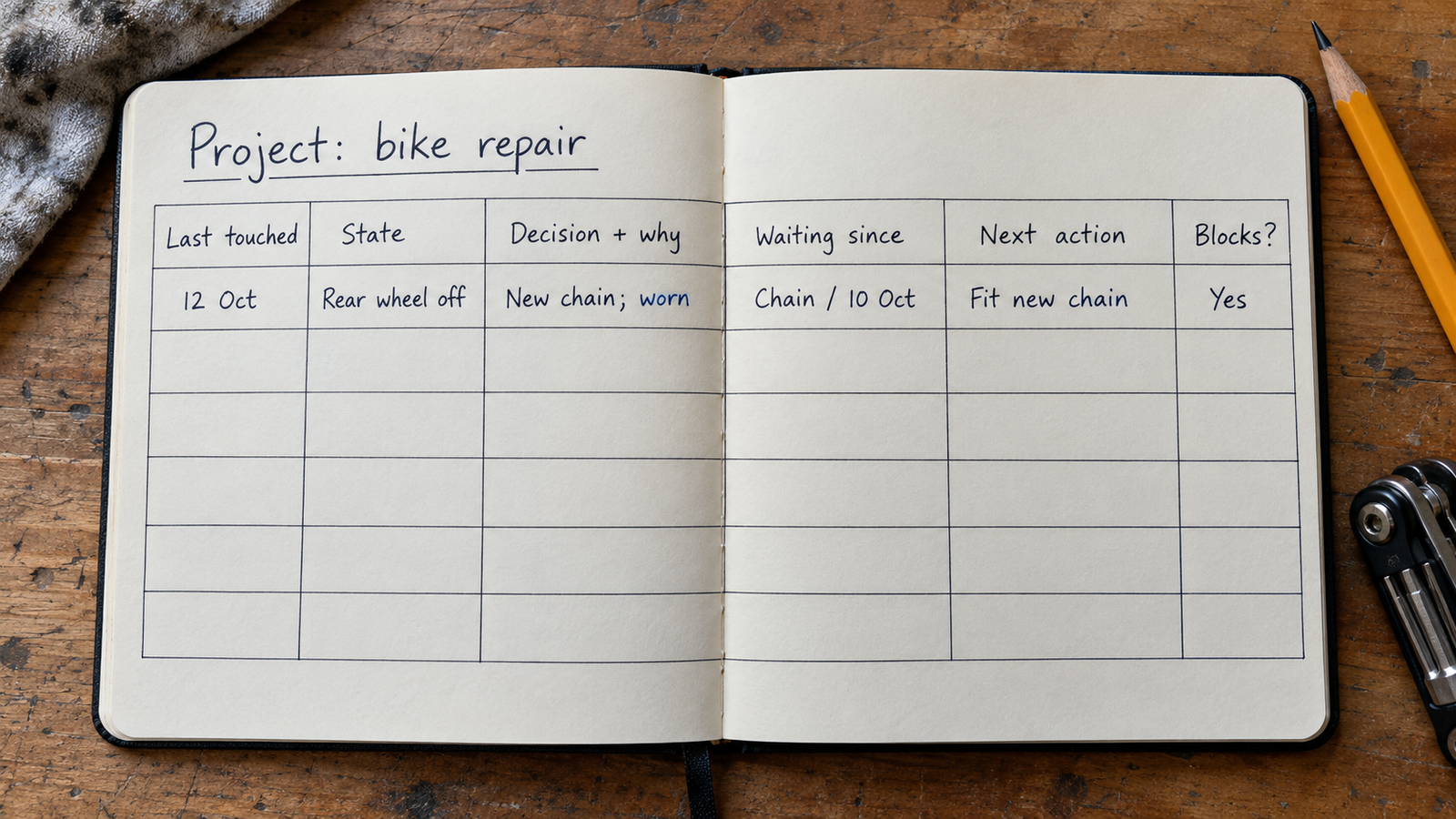
Work backwards from the moment you reopen the project. There are about six things you want to know, and a task list answers one of them.
| The question when you reopen it | The field that answers it |
|---|---|
| “What do I physically do next?” | Next action — one act, verb first, no thinking required |
| “Where exactly did I stop?” | State note, written at the end of the last session |
| “Did I already settle this?” | Decisions, each with one clause of why |
| “Why am I not just doing the obvious thing?” | Waiting on, with the date you started waiting |
| “Which of these twelve rows actually matters?” | A blocking mark on the one that unlocks the others |
| “Is this still live, or did I quietly stop?” | Last touched date |
Five of those six describe the present state of things. Only the first describes future work, and it describes exactly one step of it. That ratio is the whole point, and it is the opposite of how most project lists are built.
What isn’t on the list: estimates, percent complete, priority rankings, a phase column. On a project with one participant those are decoration — a progress bar you maintain yourself tells you nothing you didn’t already know by looking at the room.
Write the next action so it needs no thought
“Next action” only works if it is a physical act you could begin within a minute of reading it. Most people write a topic instead and don’t notice the difference.
“Sort out the wiring” is a topic. “Call the electrical supply shop on Fifth and ask whether the 20-amp circuit needs its own breaker” is an action. “Practise the B section” is a topic. “Play bars 17 to 24 at 60bpm, ten times, right hand only” is an action.
The test is whether a tired version of you, reading it cold, has to make any decision before starting. If it has to be interpreted, it isn’t a next action — it’s a note to write one later, which is the step that never happens.
Three rules keep it honest. Verb first, so the row reads as an instruction rather than a subject. Name the object and the place, because “the bracket” means nothing after a month and “the bracket in the blue parts bin” means something. And keep exactly one per project. The moment you have twelve next actions you have a task list again, and the reopening problem comes straight back.
Decisions you already made, and things you’re waiting on
These are the two fields a task list has no column for, and they are where the gap does its real damage.
Decisions, with the reason. Write the decision in a few words and then one clause explaining it. “Satin, not gloss — gloss showed every dent on the test patch.” “Book two, not book one — book one starts past where I am.” “Rear derailleur gets replaced, not adjusted — the cage is bent.” The decision alone saves you a little time. The clause is what stops you reopening it, because the reason is the part you paid for and the part that evaporates first.
Record the rejections too. “Not the cheaper faucet — half-inch inlet, wrong for the existing line.” Without that line you stand in the aisle looking at the cheaper faucet again with a vague sense that something was wrong with it, and spend twenty minutes finding out what.
Waiting items, with a date. A waiting item without a date is indistinguishable from a forgotten one. “Waiting on quote from the tiler” could be two days old or two months old, and those call for opposite responses. “Waiting on quote from the tiler — asked Oct 2” answers itself the instant you read it.
This matters more alone than on a team, because nothing in your week prompts you to chase anything. A dated waiting item is the only thing standing between “pending” and “dead”, and plenty of stalled projects are really one unchased email.
One blocking mark. Of the open rows, mark the single one that other rows depend on. On a solo project it is rarely a task you haven’t done — usually it is a decision you haven’t made or a thing you haven’t ordered. That is why the mark is worth making: it tells you the project isn’t stuck on effort, it’s stuck on a ten-minute purchase.
“A gap doesn’t erase the work you did. It erases the reasons — and the reasons are the expensive part.”
Where the record lives
Five realistic places, and the trade is always the same one: how good it is at holding state versus how good it is at being filtered.
A paper notebook is unbeatable for state notes — you write in whatever shape the thought arrives and tape the paint chip to the page. What it cannot do is answer “what am I waiting on” across everything without you turning pages.
A notes app is the default and works for a while. One note per project, next action at the top, state note underneath. It holds prose well and structure badly: once nine waiting items are scattered through four notes they stop being visible, which is the same as not being recorded.
A to-do app is built precisely for next actions and dates, and that is its limit. Decisions and state end up in a free-text note attached to a task, technically stored and never read. If your project is a sequence of errands, this is the right tool. If it is a sequence of judgement calls, it loses the half that matters.
A spreadsheet gives you real fields and real sorting — filter to everything waiting, sort by last touched — and it is genuinely unpleasant to type into while standing in a half-demolished bathroom holding a utility knife. The common compromise is to enter at a desk and consult on a phone.
A database-style app on the phone sits in between: you define the fields, entry is phone-shaped, and you can filter by status. Everything is typed by hand, which is the cost.
If you want to own the fields
Pocket Tables is an iPhone app that is really a flexible personal database — you can start from the project tasks template and then add the columns this article argues for: state note, decisions, waiting-since, blocking. There’s no account and the data stays on the phone. The honest trade-off: everything is typed in by hand, and Pocket Tables has no reminders, no notifications, no calendar, no sync between devices, no sharing, and no Android version. If what you need is something that nags you on a schedule, a to-do app is the better tool. This is for people whose problem is the gap rather than the reminder.
Coming back after three weeks
Two habits carry the whole thing, and one of them is a close-out rather than a start-up.
Close out every session with two lines. Where things stand, and what to do next. “Stopped mid-scene in chapter four, Mara has just found the letter; next bit needs me to decide whether she tells her brother.” That takes twenty seconds while the work is still in your head, and it is worth forty minutes three weeks later. Writing it at the start of the next session instead does not work, because by then the information is already gone.
Reopen in a fixed order. Read the state note first — not the task list. Then check the waiting items against their dates and chase anything older than its reasonable window. Then read the next action and ask whether it still makes sense; if it doesn’t, rewrite it before you do anything else. Then start.
Resist grooming. Reorganising the record is the most satisfying unproductive thing available to you when you reopen a project, and it looks enough like work to get away with it. Fix the state note and the next action, and leave the rest alone until something is actually wrong with it.
Do delete, though. Finished rows come off or get marked done, and items you’ve genuinely abandoned get removed rather than left to sit. A record you don’t trust is one you stop opening, and the quickest way to stop trusting it is to read a row you know isn’t true any more.
Common questions
How detailed should the task list be?
Shallower than you think, and one level deep. Breaking a solo project into sub-sub-tasks produces a structure you then have to maintain, and the detail at the far end is guesswork you’ll rewrite anyway. Keep the rows coarse and let the next-action field carry the fine detail.
Should I put deadlines on a personal project?
Put dates on things that have a real external one — a return window on a part, a recital, the day the scaffolding gets collected. Dates you assigned yourself mostly turn into rows that are visibly overdue, and a record full of wrong dates reads as untrustworthy at a glance. “Waiting since” dates are different: those are facts, and they’re the most useful dates in the record.
What do I do with a project I put down six months ago?
Don’t rebuild the plan. Read the state note if there is one, verify the waiting items — most will be dead — and write a single next action. If there’s no state note, spend fifteen minutes making one from what’s physically in front of you: what’s done, what’s half done, what’s in boxes. That inventory of the present is the record restarting, and a much smaller job than replanning.
How many projects can I track this way at once?
Mechanically, as many as you’re willing to write close-out notes for — roughly two lines per project per session you touch it. The thing that goes wrong isn’t the count, it’s projects sitting there with a stale state note, because those are indistinguishable from abandoned ones. If a project hasn’t been touched in months, move it to a separate table rather than leaving it in the active set.
Is this different from how a work project gets tracked?
It’s different in what the record has to carry. On a team, state gets reconciled by other people asking about it, and the plan exists partly so everyone can see the same thing. Alone, nothing reconciles: your record is the only handoff there is, and it’s a handoff to yourself after a delay of unknown length. That’s why the state note does more work here than any schedule.