
Your phone already keeps a perfect list of the apps you use. It’s complete, it updates itself, it costs nothing, and it is sorted alphabetically whether you asked for that or not. Which is the whole problem with deciding to “keep track of your apps”: the list you reach for first is the one you already have, and it has never once told you anything you could act on.
The record that’s worth typing by hand is narrower and considerably more awkward. Not which apps do I have, but: which account is this signed in under, what do I actually use it for, what is it charging me and on what cycle, and — the field almost nobody keeps — would I sign up for it again today.
Why the inventory you’d build by default is useless
Picture the obvious version: you scroll your app library and type two hundred names into a list. It takes an hour, and at the end you have a worse copy of something your phone maintains for free, having learned only that you own two hundred apps.
Worse, a complete list is self-defeating. Most of what’s installed on a phone needs no record whatsoever. The transit app you open twice a year, the airline app from one trip, the games you finished — none of those involve a decision, a charge or an account you’d struggle to recover. Rows for them are noise, and noise is what makes a list stop being opened.
The apps that deserve a row have at least one of three things attached: money leaving your account on a schedule, data you’d be upset to lose, or a sign-in you couldn’t reconstruct from memory. For most people that’s somewhere between fifteen and forty apps out of a couple of hundred. Starting from “everything installed” guarantees you’ll quit before you reach the forty that matter.
The two moments this record pays for itself
Nobody maintains a list out of tidiness. They maintain it because twice a year it saves them something concrete, and here the two occasions are unusually predictable.
The renewal you’d forgotten. Recurring charges are designed to be unremarkable. You signed up during a trial, or for one project, or because a free tier ran out mid-task and paying was the fastest way past it. Then the charge becomes background noise on a statement you skim. The record catches these not because it’s clever, but because writing down a cycle and a renewal date forces you to look at the thing once, deliberately, while you still remember why you signed up. Most people who do it honestly find two or three things they pay for and no longer use.
The new phone, or the handed-over device. Setting up a new phone is where the absence of a record is most expensive. A restore brings the apps back, but not which account each one was signed in under, which had data that lived only on the old device, or which thirty you kept out of inertia. Working that out app by app, with a half-migrated phone in your hand, is the slow afternoon everyone has had once. A table with an account column and a “does this come with me” column turns it into a checklist.
The same record does a quieter second job: handing a device to someone else — a tablet to a kid, an old phone to a relative, a work laptop going back. Knowing beforehand which accounts are signed in where turns that into a ten-minute handover instead of an archaeology project.
The fields that earn their place
Six columns carry nearly all the value. They’re chosen the same way the fields in any useful list are chosen: by starting from a question you’ve actually asked yourself out loud, not from “what could I possibly record?”
| The question you’ve actually asked | The field that answers it |
|---|---|
| “Which email did I sign up with — the old one or the current one?” | Account: the address or the sign-in method you used |
| “What do I even keep this for?” | Purpose, one line, in your own words |
| “Is this charging me, and how often?” | Cost and cycle: free, monthly, annual, or paid once |
| “When does it come round again, and who bills it?” | Next renewal date, plus where the charge originates |
| “If this lapsed tomorrow, would I pay to get it back?” | Re-subscribe: yes, no, or undecided |
| “Does this need to be on the new phone?” | Reinstall tier: day one, eventually, or never |
Account is the field people are most surprised by, and the one that saves the most time later. Anyone a few years into the same phone has signed up under two or three different addresses, plus a handful signed in through another account entirely. You don’t notice while everything stays logged in. You notice the moment something logs you out.
Purpose has to be in your words, not the app’s. “Scans receipts for the tax folder” is useful. “Productivity” is not. The test is whether the line would help you decide, a year from now, if the thing still has a job.
Cost and cycle matter more than the number alone. Annual charges are the ones that ambush people, because twelve months is long enough to forget entirely. Noting the cycle, even without a figure, tells you roughly when to look again.
Where the charge originates sounds fussy until you try to cancel something. A charge through an app store, one direct from a website, and one on a plan someone else manages are three different cancellation paths, and guessing wrong costs you one more cycle.
One thing this table must never hold: a password, a recovery code, a PIN, a card number or any other credential. Write the account — the email address, or the fact that you signed in through another service — and stop there. Anything secret belongs in a password manager, which is built for it; a notes table is not, and the convenience of having it all in one place is not worth it. Keep the two records separate and the app table stays something you can leave open on a kitchen table without thinking about it.
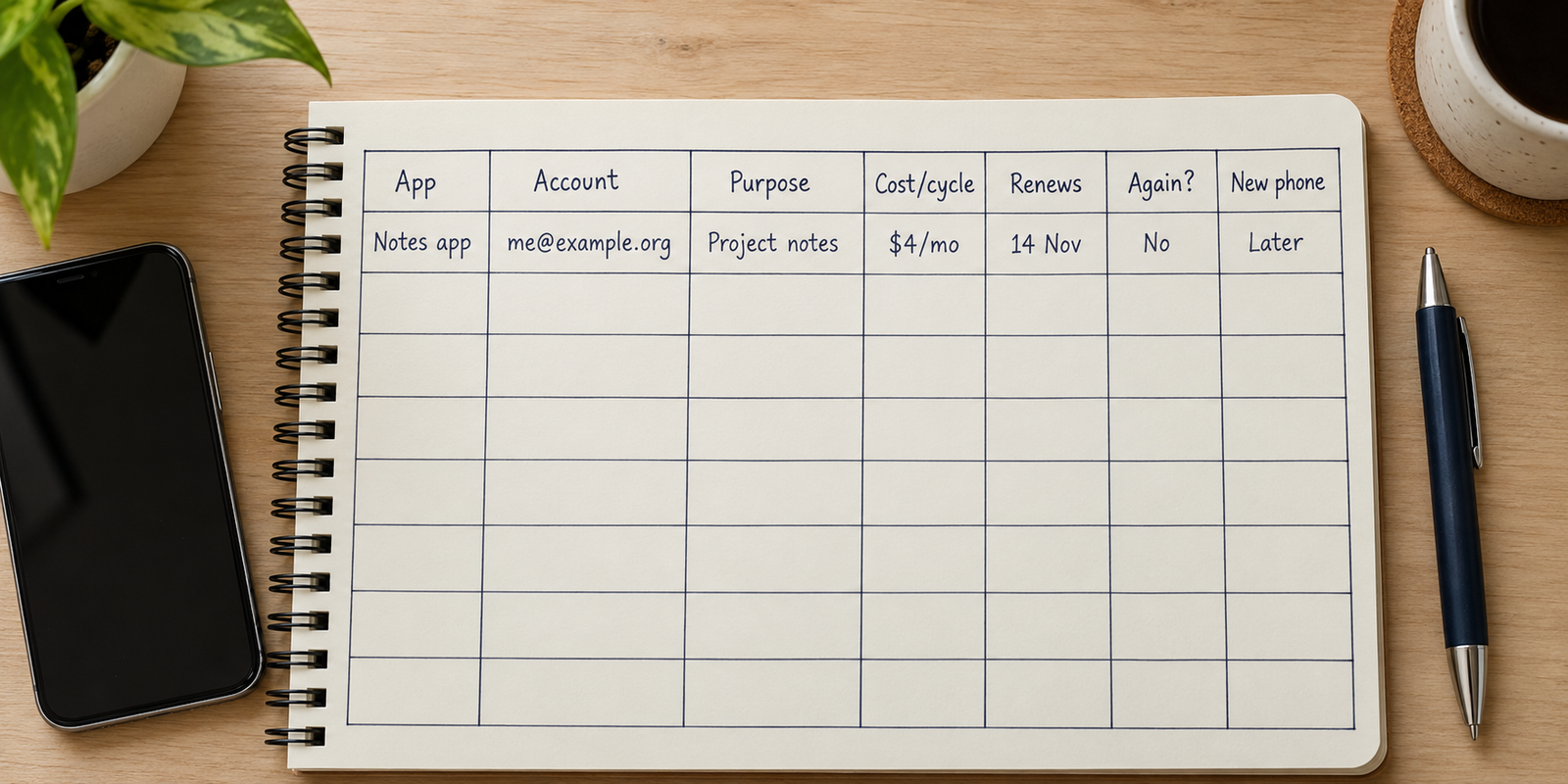
The column nobody keeps: would you re-subscribe?
Every field above is descriptive. This one is a judgment, and it’s the one that changes behavior.
The question is deliberately counterfactual: not “do I use this” but “if it lapsed tomorrow, would I pay to get it back?” Those produce different answers far more often than you’d expect. Plenty of apps get opened weekly out of habit and would not be missed for a second if they vanished. A few get opened rarely and would be re-bought within the hour.
Answer it with three values — yes, no, undecided — and resist adding nuance. The value is in how uncomfortable “no” is to write next to something you’re currently paying for. That discomfort is the mechanism. A row reading monthly, renews the 14th, would not re-subscribe is a decision waiting to be made, and you made the hard part of it on a calm afternoon rather than in the thirty seconds after a charge notification.
“The question isn’t which apps you have. It’s which ones you’d choose again if the phone arrived empty tomorrow — and that list is always shorter than the home screen suggests.”
Mark “undecided” freely on the first pass, but pair it with a date: revisit at the next renewal, with another month of evidence. Rows still undecided a year later have answered themselves.
Where the record lives
Four realistic homes, and the choice comes down to whether you want to sort and filter or just read a page.
Your phone’s own subscription screen is authoritative for anything billed through the app store and should always be your source of truth for those renewal dates. What it cannot do is hold your own fields. There’s nowhere to write what an app is for, which account it’s under, or whether you’d buy it again, and it knows nothing about charges billed directly by a website.
A notes app is where most people start, and it’s fine for twelve apps in a flat list. It stops working the moment you want to see only the annual renewals, or only the rows marked “would not re-subscribe.”
A spreadsheet does everything this table needs: real columns, sorting by renewal date, filtering by cycle. The friction is that updating one cell means finding a laptop, while the moments worth recording — an unexpected charge, a surprise sign-out — happen on the phone.
A database-style app on the phone sits between the two: you define the fields yourself, entry is phone-shaped, and filtering works on any column. Everything is typed in by hand, which is the real trade-off and, for a list this short, a fairly cheap one.
If you’d rather own the columns
These six fields are already set up in the app directory template for Pocket Tables, an iPhone app that’s really just a flexible personal database — start from the template, then add or delete fields until the table matches what you actually want to know. Being straight about what it doesn’t do: every row is typed in by hand. It won’t scan your phone, detect what’s installed, read your subscriptions or your receipts, remind you before a renewal, sync between devices or share a table with anyone, and there’s no Android version. There’s also no account, so the data stays on the phone. If you want something that finds your charges for you, this isn’t that tool. It’s for people who’d rather decide what the columns are.
Keeping it current without making it a chore
Unlike most personal lists, how to keep track of the apps you use barely needs upkeep: the record hardly changes. You don’t start paying for new things weekly. Two triggers and one short review cover it.
Trigger one: when you sign up for anything recurring, add the row in the same sitting. You will never again know the cycle, the account and the reason as precisely as you do in that moment, and it takes under a minute.
Trigger two: when a charge on a statement makes you pause, go and find the row. If there isn’t one, that’s the signal to write it — along with an honest answer in the re-subscribe column, which you are unusually well placed to give while mildly annoyed.
Then once or twice a year, ideally just before an annual renewal you know about, read the whole table. Delete rows for apps you’ve removed, fix the account column for anything you’ve migrated, and act on the “no” rows. Fifteen minutes on thirty rows. If it’s taking longer, the table is too big and you’ve started logging apps that never involved a decision.
Common questions
Isn’t this just a list of my subscriptions?
Subscriptions are the part that costs money, so they’re the obvious place to start, but they’re not the whole record. Free apps holding data you’d hate to lose, and apps signed in under an address you no longer check, belong in it too, and neither shows up on a billing screen. Think of it as the apps that could cause you a problem; the paid ones are a subset.
How often does it need updating?
Far less often than most lists. Add a row when you sign up for something recurring, correct one when a charge surprises you, and read the whole table once or twice a year. There’s no weekly habit to maintain, which is the main reason this particular record tends to survive.
Should free apps go in it?
Only the ones with something at stake: data stored only in that app, a sign-in you couldn’t reconstruct, or a free tier you suspect will eventually ask for payment. A free app you could delete and reinstall with no consequence doesn’t need a row, and adding it turns a useful table back into a copy of your home screen.
How do I handle apps shared across a household?
Add a column for who it’s billed to. Shared plans are where duplicate payments hide, because two people can each pay for the same thing without either knowing. One shared table is ideal; failing that, note in your own row which of you is the billing account.
Should I build this before or after setting up a new phone?
Before, if you have the choice — the old phone is the only place the answers still exist, and walking it with a blank table is the easiest first pass you’ll get. If the new phone is already running, do it as you go: each time you sign into something, write the row. You’re answering the account question anyway, so keep the answer.