
Adding up hours is not the hard part. You spent four hours at the food bank on a Saturday, you write down four, and by June you have a number. The number is what everyone fixates on, and it is the one piece of the record that proves nothing on its own — because at the moment the hours finally matter, somebody is going to ask who can confirm them.
That question always arrives late. A form in your senior year wants a signature for something you did as a sophomore. An employer’s matching program wants a contact at the organization. A committee wants an email from an official address. The hours genuinely happened; you were there. But the coordinator who watched you do them left in March, the sign-in sheet lived in a binder in a back office, and the group’s inbox now goes to whoever took the role over this year. Your note says “Saturday – food bank – 4 hrs,” and there is nothing in it anyone can check.
So build the log around the awkward question rather than the easy one. Every single row should answer: who could confirm this?
Start from the question you’ll be asked, not the total
There is no universal standard for volunteer hours, and anyone who tells you otherwise is describing one organization’s rules as though they were everyone’s. The requirement comes from whoever is asking: a school office, a scholarship committee, a court clerk, an HR portal, an honor society, a club. One wants a signature on their own form. One wants an email sent directly from a supervisor’s work address. One wants a letter on letterhead. One takes your word for it and never follows up.
You usually don’t know which of those you’re facing until long after the hours are done, and the same hours can get asked about twice by two different people who want completely different things. That’s the whole design problem. You’re not trying to meet a standard; you’re trying to hold a record detailed enough to satisfy whatever the eventual asker turns out to want.
Which, in practice, means recording slightly more than feels necessary at the time. Not photographs and not paragraphs — one more line per shift, the one naming a person. It costs about fifteen seconds on the day and it is the only part of the entry you cannot manufacture later.
What one verifiable entry contains
Five fields carry the entire record. Date, organization, hours, what you actually did, and the name and contact of the person who supervised you. Anything beyond those five is optional; any entry missing the fifth is a number with no backing.
Two of the five are routinely written badly. “What you did” gets recorded as “volunteered,” which is unrecognizable to the person being asked to confirm it two years on. And the supervisor field gets recorded as the organization — “City Shelter” — which is a building, not a witness. A building cannot remember you.
| Field | What it has to survive |
|---|---|
| Date and start/end times | Being cross-checked against someone else’s schedule or shift roster — which is why the times beat a bare “4 hrs” |
| Organization, in full | The legal name differing from the one everyone says out loud, and the local chapter differing from the national body |
| Hours, counted honestly | Being added to a total someone else checks; keep travel and prep time in their own column rather than folded in |
| What you did, specifically | Being read aloud to a supervisor who met two hundred volunteers — “sorted and boxed donations in the warehouse” jogs a memory, “helped out” doesn’t |
| Supervisor’s name, role, email | That person changing jobs, which is the single most common way a verifiable record becomes an unverifiable one |
| Program or event name | Letting a large organization find you in their own records when your name alone doesn’t ring a bell |
Add a seventh column if you want one that earns its place quietly: how the shift was arranged. A teacher’s sign-up sheet, a parish bulletin, a friend who brought you along, an online portal. When a record is challenged, that’s often the thread that leads to a second person who remembers.
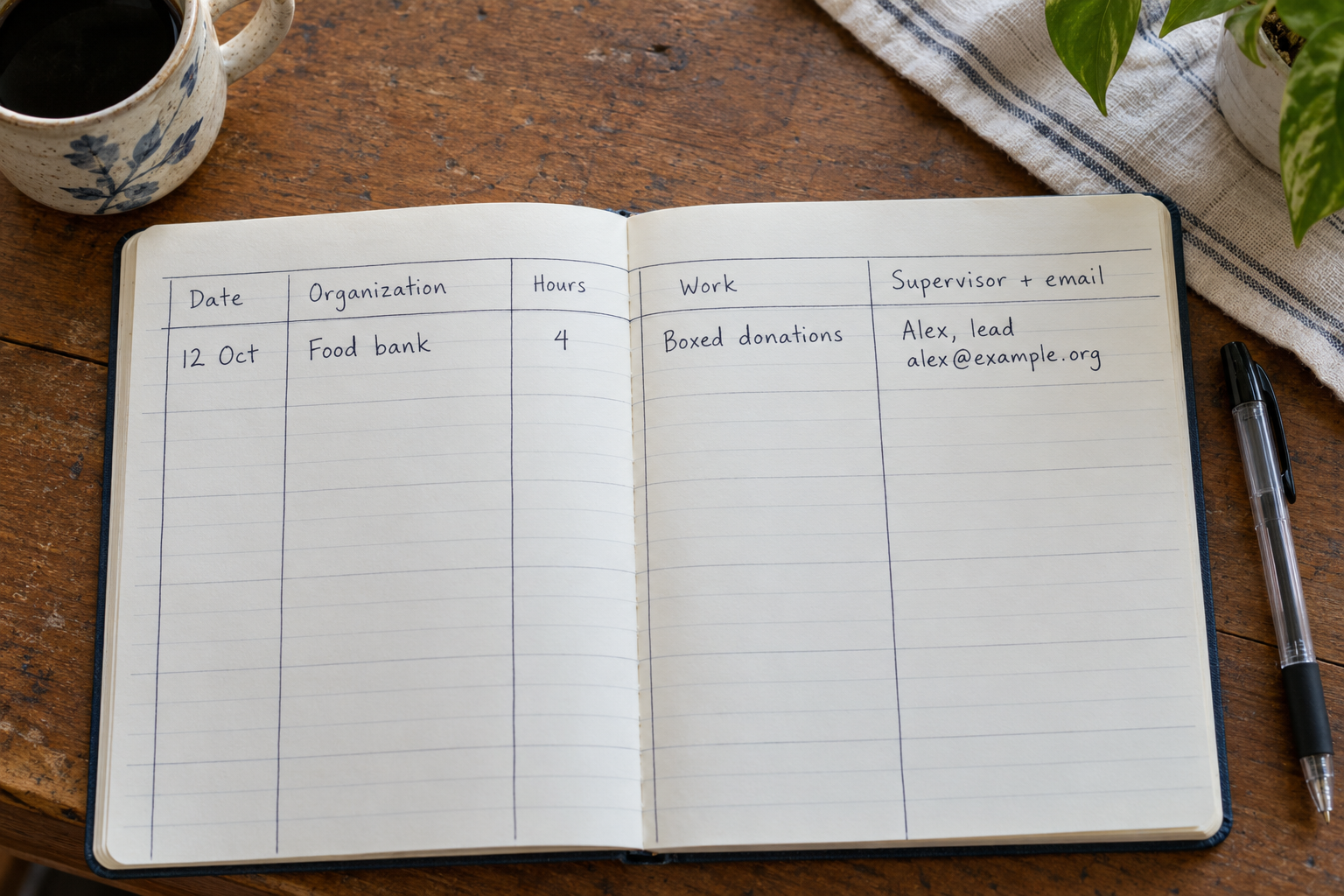
Capture the person while they’re still standing there
Everything above is easy except the supervisor’s contact details, and that one is only easy on the day. A week later it’s a phone call. A year later it’s archaeology.
So ask at the end of the shift, out loud, in one sentence: “Could I take your name and the best email for you, in case someone needs to confirm these hours later?” Nobody finds this strange. People who run volunteer shifts are asked this constantly, and most of them would far rather give you a card now than field a confused email in eighteen months.
Write down their role as well as their name, because “Dana Whitfield, Saturday warehouse lead” survives Dana moving on in a way “Dana” does not — whoever holds that role next can at least place the job. Where there’s a sign-in sheet, photograph it before you leave; it’s a dated document with the organization’s name on it and your handwriting in it. Where there’s a staff email confirming your shift, keep it in a dedicated folder rather than letting it age out of your inbox.
Logging as you go versus reconstructing it later
Logging as you go takes roughly ninety seconds per shift and produces a record that holds up. Do it in the car, on the bus, in the ten minutes before you forget whether it was two hours or three. The window closes faster than people expect: the date and the hours stay accurate for about a week, the description for about a month, and the name of the person who ran the shift disappears almost immediately unless you wrote it down.
Reconstruction is the other case, and it’s worth treating as a real skill rather than an admission of failure, because most people come to this topic having already volunteered for a year with no log at all. You rebuild from traces. Your calendar, if you put the shifts in it. Photos, which carry dates and often locations. Text threads and group chats where somebody asked who was coming Saturday. Emails from the organization’s mailing list or shift reminders. Transit or parking charges on a bank statement that pin a date even when nothing else does.
Two rules make a reconstruction defensible. Mark reconstructed entries as reconstructed — a simple “estimated from calendar” in a notes column — so you never present a guess as a contemporaneous log. And round down, every time, on anything you’re not sure about. An honest short total you can stand behind is worth more than a generous one that collapses the first time somebody checks a single row.
“The hours you can prove are the only hours you have. Everything else is a story about a Saturday, told by the one person with a reason to tell it.”
If you’re reconstructing, do the contact-tracing part first and the arithmetic second. Email the organization now, while someone who overlapped with you is still there, and ask whether they can confirm roughly when you volunteered and with whom. That reply, saved, is worth more than a tidier spreadsheet.
Where the record lives
The format matters less than the fields, but one principle overrides all of it: the record has to be yours. Hours sitting in an organization’s volunteer portal are convenient right up to the day your login stops working, the group switches systems, or the chapter folds. Treat anything they hold as a useful second copy and keep your own regardless.
A paper notebook is excellent for capture and poor for everything after. It’s the fastest thing to write in at the end of a shift and the hardest to total, search or hand to anybody. If you use one, photograph the pages occasionally so a lost notebook isn’t a lost year.
A notes app is where most people start and where most logs stall, because a wall of undated text can’t be sorted by organization or filtered to one school year.
A spreadsheet is the honest default: columns for all six fields, a sum at the bottom, filters by organization or date range. The catch is entry. Typing into a spreadsheet on a phone in a parking lot is unpleasant enough that the ninety-second habit often doesn’t survive contact with it.
A phone-shaped database app sits in between: you define the fields, entry is built for a phone, and you can filter and total without a laptop.
If you want these fields on your phone
Pocket Tables is an iPhone app that’s really a flexible personal database — you can build this log as a table in a few minutes, or start from something close in the template library and rename the columns to date, organization, hours, what you did and supervisor contact. There’s no account and the data stays on the phone. The straight version of the trade: every entry is typed in by hand. Pocket Tables won’t remind you to log a shift, won’t email anyone for a signature, doesn’t sync or share, and there’s no Android build. If you want reminders and automatic totals handed to you, a spreadsheet with a calendar alert will get you most of the way.
When the organization hands you its own form
Sooner or later one of them will. A sheet with boxes for dates, hours and an authorized signature, and it has to be that sheet. This is where people discover their log was built as a replacement when it should have been built as a source.
Your record doesn’t substitute for the form; it’s what makes the form fillable in one sitting instead of three weeks of emails. You sit down with your log open, copy the dates and hours across, get the signature, and the whole thing takes an afternoon. Without the log, you’re reconstructing and chasing signatures at the same time, usually against a deadline.
Two habits close the loop. Scan or photograph the completed, signed form before you hand it over, every time — a signed page is the strongest single artifact you’ll ever hold for those hours, and giving away the only copy is a genuinely bad trade. And add a short status column to your log: which entries have been submitted where, and where your copy of each signed form is saved. A year in, with hours going to two or three different places, that column is the thing that stops you double-counting or re-chasing a signature you already have.
Common questions
How specific does the description of the work need to be?
Specific enough that the person who supervised you would recognize the shift from it. One clause usually does it: “ran the registration table at the 5K,” “read with second graders in Ms. Alvarez’s class,” “painted the east fence.” Avoid both extremes — “volunteered” tells a verifier nothing, and a paragraph takes long enough to write that you’ll stop writing it.
What if the person who supervised me has left the organization?
Go back to the organization rather than chasing the individual. Give them the dates, the program name and the former supervisor’s name, and ask who can speak to records from that period. Whoever holds the role now can often confirm from their own rosters. This is also the argument for recording the role alongside the name in the first place — it gives the organization a place to look.
Should I count travel time, training, or prep done at home?
Record them, but in their own column rather than mixed into the on-site hours. Whoever is asking for your hours decides what counts, and different askers draw that line in different places. Keeping the categories separate means you can present either figure accurately; folding them together means you can never unfold them and you’ll be guessing when someone asks.
Isn’t the organization’s sign-in sheet enough on its own?
It’s good evidence and a poor system. You don’t control it, you can’t search it, you may never see it again, and it usually records that you arrived rather than what you did or how long you stayed. Photograph it when you can and keep your own entry anyway. Two independent records that agree are far more persuasive than one.
Does tracking my hours matter for my taxes?
That’s a question for whoever does your taxes, and the only honest answer here. Tracking hours in this guide is about being able to document what you did for the person or organization asking you to document it — nothing in it is tax guidance, and you shouldn’t treat it as any.