
The standard job application tracker is a list of company names with a status column beside each one: applied, interviewing, rejected. Ten minutes to set up, reassuringly organized, and six weeks in it fails you in the most ordinary way imaginable. The phone rings, a voice says a company name, and you have nothing.
Not nothing about whether you applied — the status column handles that one question perfectly. Nothing about which of your three resume versions went to them, or what the posting actually said the job was, because the posting came down two weeks ago. Nothing about whether the voice is someone new or the recruiter who called you in week two about a different company entirely. Nothing about what the two of you agreed would happen next, or when.
A long search doesn’t wear down your motivation first. It wears down your recall, quietly, one indistinguishable Tuesday at a time.
What breaks at week six
In week one a tracker feels like bureaucracy. You have four rows and can recite all four from memory, hiring manager’s first name included. Of course you can — there are four. By week six there are thirty, and the failures are specific enough to list.
You can’t tell two roles apart. One company posts three openings whose titles differ by a word. You applied to one. Which one? Your row has the company name and nothing else, and the posting is gone.
You can’t remember which version you sent. If you tailored anything — and most people tailor something — you have several documents with similar names and no record of which went where. Somebody is about to ask about a project, and you’d like to know whether you mentioned it to them.
The posting has evaporated. Listings come down within days. Whatever it said about the work, the location policy, the team, the posted range — if you didn’t copy it, you’re reconstructing it from memory.
You’ve double-counted a person. One recruiter, two companies, two conversations a month apart. Without a name in the record they’re two strangers to you and one continuous relationship to them.
You told four people you’d follow up “next week.” Four different weeks, all now past. Your status column says “waiting” for all four, which is as useful as a blank cell.
None of these is a discipline problem. Each is a missing field — cheap to add while the information is in front of you, expensive to recover afterward.
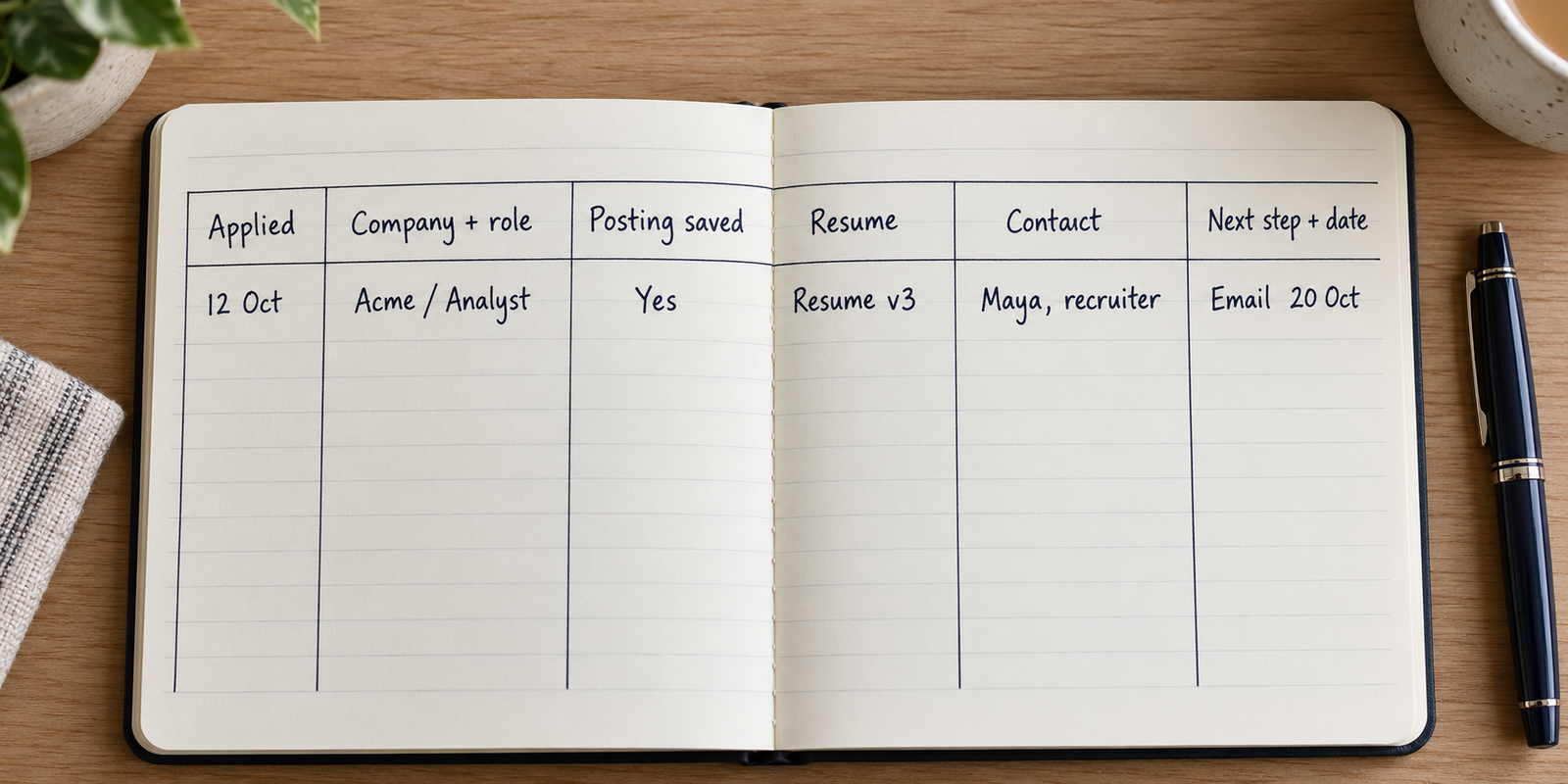
The six fields that carry the record
The useful record is narrower than people expect. Six fields cover nearly all of it, and most take seconds to fill in at the moment you submit.
The date you applied. Plain, boring, the spine of everything else. Almost every question you ask later is really about sequence — before or after that call, how long this one has been sitting, which of these two came first.
The company and the exact role title as posted. Copy it character for character rather than paraphrasing. “Operations Associate” and “Associate, Operations” may be two different openings at one organization, and a paraphrase won’t preserve the difference.
Where you found it, plus the posting itself. Not the link — the text. Paste the listing body into a notes field. One keyboard shortcut, and it’s the only field that can’t be reconstructed once the page is taken down. Record the source separately: a board, a careers page, a person who sent it to you.
Which version you sent. The file name is usually enough, plus whether a cover letter went with it and one line on the angle you took. This is the field people skip and regret, because it’s the one thing the other side is looking at while they talk to you.
The human. A name, how you came into contact, and where they sit — recruiter, hiring manager, someone who referred you. One name per row is enough to start.
What happens next, and when. One line in plain words, plus a date. Not a status — and it’s where most trackers quietly die.
| Field | What it saves you six weeks later |
|---|---|
| Date applied | Sequence — whether the thing you half-remember happened before or after a particular call |
| Company and exact posted title | The difference between two near-identical openings, and between the two companies whose names you keep swapping |
| Source, plus the posting text pasted in | What the listing said about the work, the location and the range, after the page is gone |
| Version sent | What the person on the other end is reading while they’re asking you questions |
| The human, and how they reached you | Whether the caller is new or someone you already spoke to about something else |
| Next action and its date | A sorted list of what you owe this week, instead of a column that says “waiting” thirty times |
The follow-up field is a date, not a status
Here’s what makes a tracker stop working: every status column converges. Within two weeks almost every open row says the same word — waiting, pending, submitted, no response — and a column where every cell reads the same is not a column, it’s decoration. You stop opening the file because the file stopped telling you anything.
A date behaves differently. It’s unique per row, it changes meaning every day on its own, and it sorts. Sort ascending and the top of the list is today’s work. Nothing else in the record does that.
So the rule is: every time an interaction ends, before you close the tab or put the phone down, write a date in that field. If someone gave you a timeline, use theirs. If nobody said anything — most of the time — pick one yourself and write it anyway. An arbitrary date beats an honest blank, because the blank never surfaces again and the date will.
Write the action beside it in words you’ll understand cold: “email Priya to ask if the panel is scheduled,” not “follow up.” Six weeks from now, “follow up” means nothing.
The rejection note, and what twenty rows will tell you
When a no arrives, the instinct is to close the row and get it off the screen. Do the opposite: spend thirty seconds writing what it said, in their words, with the date. Then archive the row rather than deleting it.
Three kinds of ending are worth distinguishing, because they are not the same information. A reply that gives an actual reason, which is rare and worth copying verbatim. A form message that gives none, which is still a data point with a date on it. And silence, which never resolves itself — so you close it yourself, write the date you decided it was closed, and stop carrying it as an open question.
One tells you nothing. Twenty, in the same table with the other five fields filled in, are the only feedback a search ever produces — not because the pattern is profound, but because it’s the only part of the process you can see.
That’s the honest limit. You don’t know what happens to an application after you hit submit, not in any specific case, and anyone who claims to know what happened to yours is guessing. Which is exactly the argument for your own record: it’s the half of the story that belongs to you. What you sent, to whom, when, in which version, and how it ended.
What twenty archived rows give you is modest and still more than nothing: which sources produced applications that went anywhere, which exact titles you’ve been aiming at versus which produced a conversation, how long things sat before moving. Treat those as questions to look at, not conclusions. Twenty rows is a small number — it’s just that zero is a smaller one.
“You don’t get to see what happened to your application after you sent it. You only get to see what you sent, to whom, and when — so keep that half well, because it’s the half you own.”
Where the record lives
Four realistic options, and the choice mostly comes down to where you’re standing when the information arrives.
Your inbox, used as a de facto tracker. Tempting, free, already holds the threads. But it only contains what came through email, has no concept of a next action date, and can’t hold the posting text or the version you sent. Searching it works right up until two companies use the same subject line.
A spreadsheet. Sorts, filters, arbitrary columns, costs nothing — the obvious answer for most people. The friction is that half the events in a search happen when you’re nowhere near a desk, and a row you’ll fill in later is a row you’ll fill in wrong.
A notes app. Fine for ten rows. It collapses the moment you want to sort by anything — which is the moment the next action date becomes useful, and roughly the moment you need it most.
A database-style app on your phone. You define the fields, entry happens where you are, and it still sorts and filters. Everything is typed by hand; nothing is looked up for you.
If you want to own the columns
Pocket Tables is an iPhone app that’s really a flexible personal database: you pick a starting point from the starting templates, then add or delete fields until the table matches the six above — there’s no account and the data stays on the phone. The honest trade: every row is typed in by hand. Pocket Tables will not import job listings, read your email, scrape a posting, remind you about a date, sync between devices or share a table with anyone, and there’s no Android version. If you want a tool that pulls postings in automatically, that’s a different category of product and a reasonable thing to want.
Keeping the record honest once the search gets long
In the end, how to keep track of job applications over a long search is two habits and a weekly pass.
Create the row in the same session you submit. Not that evening, not on Sunday. The posting is open in front of you, the file name is in the upload dialog, the source is in your history. Thirty seconds now, fifteen minutes of archaeology later. If you truly can’t, at least paste the posting text somewhere — that’s the irreplaceable part.
Spend two minutes after every conversation. Name, what was said about what happens next, and the date, while you can still hear the phrasing. This is where the record either stays trustworthy or starts becoming fiction, and a record you’ve caught being wrong once is a record you stop opening.
Then, once a week, ten minutes: sort by next action date, deal with anything past due, and close out rows that have clearly ended — with a date and a note, archived rather than deleted. Resist adding columns during this pass. The instinct after a few weeks is to get granular about stages, and granular stages invent a precision you don’t have. Open, closed, and a real date for the next thing is enough.
Common questions
How much of the job posting should I copy into my record?
More than feels reasonable. Postings disappear quickly, and a link to a dead page tells you nothing. Paste the whole body if it’s easy; if you’re trimming, keep the exact title, the description of the work, whatever it said about location and compensation, and the team name.
Do I need a tracker if I’m only applying to a handful of places?
Probably not a formal one. Under about ten rows, memory plus your sent folder genuinely holds. The break point isn’t a number, it’s the first time you can’t name every row from memory — and you’ll notice when it happens. Starting then is fine; starting earlier just means less reconstruction.
If a date does the real work, what should the status column say?
Keep one, but keep it coarse — open or closed, maybe a third value for scheduled. Coarse statuses stay accurate with no effort. Detailed stage names drift within days and give you a column that looks precise while quietly being wrong, which is worse than one that admits it knows two things.
Should I record applications I started but never sent?
Yes, as one row with a clear marker. Otherwise you’ll rediscover the same listing a month later and redo the same research. A single line on what stopped you is enough, and occasionally that reason has changed and the row is worth reopening.
What do I do with the record once the search is over?
Stop maintaining it and keep it. Names, dates, versions sent and how each row ended take up almost no space and are oddly useful later — next time you start with real contacts and accurate dates rather than a vague memory of a hard few months.