
Almost every home maintenance record is written for a stranger. The three-ring binder with labeled tabs, the spreadsheet with a sheet per room, the folder of scanned manuals — all of it built on the idea that one day you’ll sell, and a grateful buyer will leaf through it. Maybe. That buyer is hypothetical and years away, and designing for them produces a record that’s gorgeous and useless in the meantime.
Here’s who actually opens it. A technician in your basement with a flashlight, asking when the water heater was last touched and by whom. A warranty line asking for the serial off the data plate and the install date. A claim where every field is fine except the two that matter: the date, and the receipt. These people turn up within months, and they all want the same handful of facts.
Who actually opens the record
The next contractor. A tech walking into an unfamiliar system spends the first stretch of the visit on discovery: what’s installed, what’s been done, what someone already ruled out. Hand over the model, the install date and the last person’s note and you skip most of that — and you stop paying twice for the same diagnostic, the quiet cost of having no record at all.
The warranty or claim process. Warranties, home warranty plans and insurance claims differ wildly in what they cover, but they’re boringly consistent in what they ask for: what the item is, when it was installed or serviced, who did the work, what it cost, and something documentary behind it. You don’t need to understand a policy to keep those five fields filled. The missing one is almost always the date, and the second is the receipt.
You, fourteen months later. The same drain backs up. Without a record you’re starting from zero, describing the symptom badly over the phone. With one you can say “this happened in March, Northside cleared a blockage at the stack and said if it came back it’s probably the line to the street.”
A future buyer. Last, and least. Genuinely useful — but a record built only for them is a record nobody uses for years.
The fields that earn their place
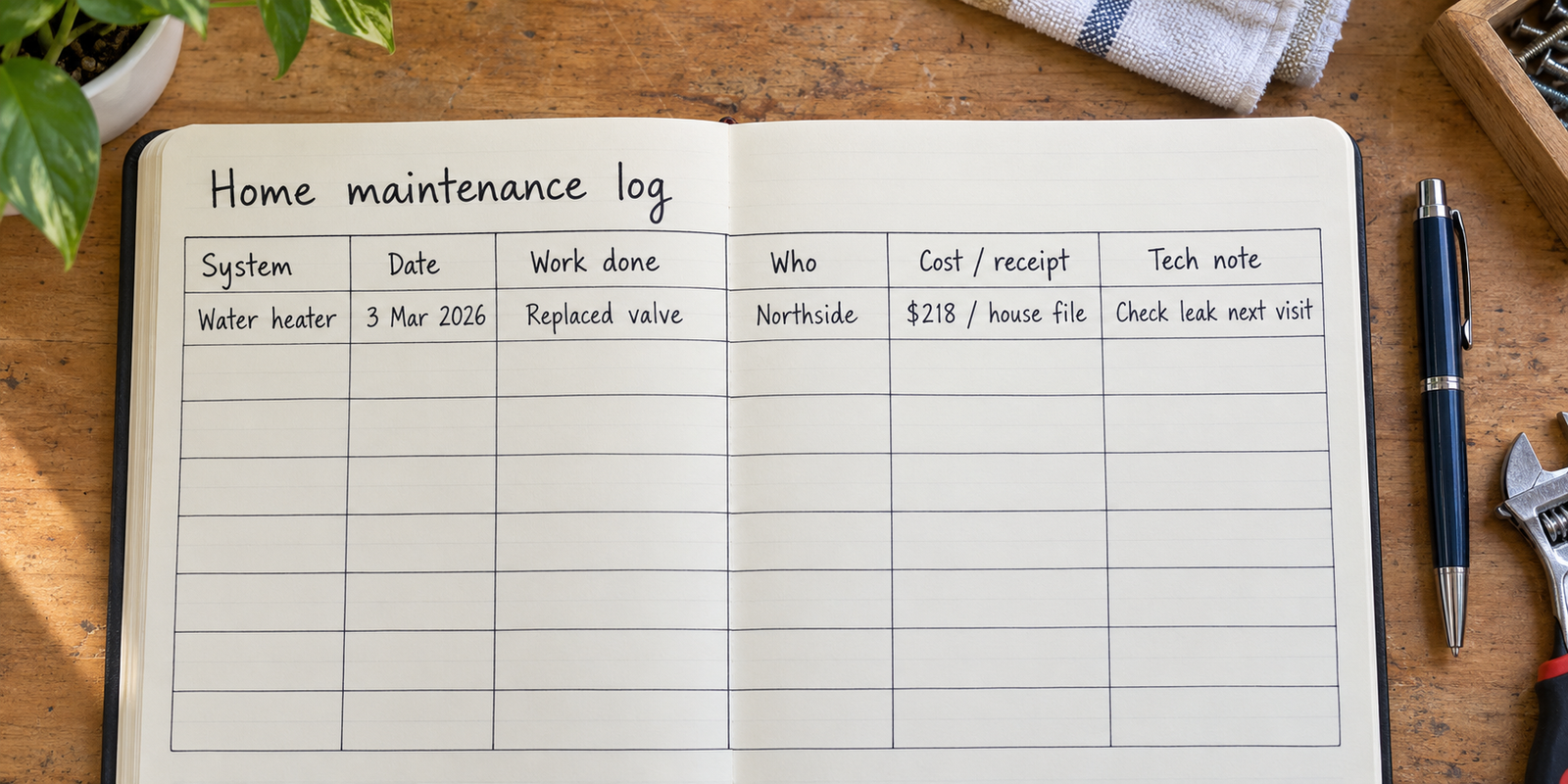
Six columns do nearly all the work. The temptation is to build fifteen, fill in four, and abandon the thing by spring.
| Field | What it saves you later |
|---|---|
| Item or system | Lets you pull the whole history of one appliance instead of scrolling a timeline of the entire house |
| Date | The single field every warranty line, claim form and contractor asks for first |
| What was done | The difference between “someone looked at it” and “the flame sensor was replaced” |
| Who did it | Callbacks on work still under a labor guarantee, and a shortlist of people you’d use again |
| Cost and where the receipt is | A pointer to the proof — “scanned, house folder, 2026” beats a lost invoice every time |
| Note, in their words | The thing a technician mentions on the way out that turns out to matter two years later |
Two more fields belong to the equipment rather than each visit: model and serial number. They’re on a data plate on the unit, and they’re the first thing asked for on any parts order or warranty call. Record them once per appliance and you never crawl behind the dryer with a phone torch again.
Then there’s which events get a row at all. Anything a professional touched. Anything that failed once, because repeat offenders are the point of a timeline. Anything you paid someone to look at even if they found nothing — “inspected, no issue, March” is real information next time the symptom appears. Installs, with the date, because that date starts every warranty clock in the house. And the most-thanked entry in anyone’s record: part numbers and sizes. Filter dimensions, belt sizes, bulb types for awkward fixtures, and paint — brand, finish, color code, and which room.
Not worth a row: bulbs you changed, cleaning you’d do anyway, and anything you’re logging because logging feels productive. One structural rule holds it together — the record describes events, not tasks. The moment a maintenance log doubles as a to-do list it becomes something you feel faintly guilty opening, and then you stop opening it. Being pure history is exactly why it stays trustworthy.
Don’t write down a schedule you can’t stand behind
This is where most records go wrong. The standard advice is to build the calendar first: a grid of tasks with intervals copied off whatever page came up in a search. Those numbers aren’t yours. Intervals depend on the specific equipment, how hard it runs, conditions where you live, and what the manufacturer requires to keep a warranty intact. A figure copied from a stranger is one you can’t defend to a technician, a manufacturer, or yourself.
Three sources for an interval are worth writing down, and all three are attributable.
The manual or the warranty terms. If the paperwork for the unit states a requirement, that’s a real number with a real source. Write it in the record with the source — “per manual, p. 14” — so in four years you know whether you’re following the manufacturer or a half-remembered rule.
The person who installed or serviced it. Techs routinely say something like “with this model and your water, I’d look at it again before next winter.” That’s a judgment from someone who saw the actual equipment. Record it as a quote with their name on it. If it turns out to be wrong, you know whose call it was.
Your own accumulated history. The one most people skip, and the reason the log is worth keeping. After enough entries it stops being a list and starts being evidence. The gutters needed clearing twice last autumn and once the year before — that’s an interval measured on your trees. The filter looked bad sooner than expected two changes running — that’s a pattern the record found, not one you decreed in advance.
So the honest structure is: the record holds what happened, plus what a qualified source said should happen next. It doesn’t hold your guesses dressed up as a schedule.
The entry that survives a claim
Compare two rows for the same event.
The first: “Furnace serviced, last winter, guy came out, ~$200.” Every word is true and none of it is usable. “Last winter” isn’t a date, “guy” isn’t a company, “serviced” doesn’t say whether a part was replaced or someone just looked, and “~$200” has nothing behind it.
The second: “Mar 3 2026 — upstairs furnace — Northside Heating (555-0142), invoice 4471 — cleaned burners, replaced flame sensor — $218 — invoice photographed, house folder — tech said the blower motor is noisy but fine for now, flagged for next visit.”
Same visit. One row is a story, the other is a record, and writing the second took ninety seconds while the truck was still in the driveway.
Two details do disproportionate work. The invoice or work-order number is the handle the company uses to find the job in their own system when you call back. And separating a maintenance visit from a repair matters, because coverage terms often hinge on whether required upkeep was done and by whom — a row naming who worked on it, in what capacity, is more defensible than one saying only that something happened. You’re not interpreting a policy; you’re keeping the fields it asks about from being blank.
“A maintenance record isn’t a promise about the future. It’s a witness to the past, and the only questions it has to answer are when, by whom, and where’s the paper.”
Where to keep it
Four realistic options, and the trade is always between capture friction and whether you can query the thing afterwards.
A paper binder near the equipment is unbeatable in one moment: a contractor physically standing next to the furnace. It’s useless when you’re at the hardware store or on a warranty call from another room.
A phone album of receipt photos has almost no capture friction, which is why most people default to it, and no structure at all — six months later you’re scrolling images for the one from the plumber, unable to ask it for everything about one appliance.
A spreadsheet sorts, filters and totals beautifully, and is genuinely awkward to type into while crouched in a crawlspace. The usual compromise is capture now, enter later.
A database-style app sits between the two: defined fields, phone-shaped entry, filter by appliance or by year. Everything is typed, nothing is fetched. Whichever you pick, the two-step pattern is what survives — photograph the invoice the moment it’s in your hand, then type one row that evening. The row holds the facts and a pointer; the image is the proof, sitting wherever your files live.
If you’d rather have fields than a folder
One row per visit, with columns for the date, the company, the invoice number and the note, is what the home repairs template sets up for you to reshape — add a serial-number field, delete the ones you don’t want. Pocket Tables is an iPhone app that’s really a flexible personal database: no account, and the data stays on the phone. The limits matter here, so be clear on them first. Every row is typed in by hand, there’s no sync, no cloud backup and no way to share a table with a partner or a property manager, and there’s no Android version. There are no reminders either, which suits this job — it’s a record of what happened, not a nudge about what’s next.
Keeping it accurate once it’s running
Two habits and one honest convention. Habit one: the row gets written while the truck is still in the driveway, not on Sunday. Before anyone leaves, ask what they actually did and what they’d look at next time, and write both down with their name attached. Those answers decay within hours.
Habit two: don’t backfill the house. The impulse after setting up a record is to reconstruct ten years from memory, which produces invented dates, which quietly poisons everything. Start at today; the log gets more valuable every month on its own.
The convention: write “unknown” and mean it. “Water heater — install date unknown — serial A4471982 — first logged Oct 2026” is a perfectly good entry. A record that marks its own gaps is one you’ll trust in three years. A record with plausible guesses in the date column is worse than none, because you can’t tell which rows are real.
Common questions
I just bought the house. Should I reconstruct its history?
Only the parts you can verify. Copy model and serial numbers off the equipment, keep whatever receipts, permits or disclosures came with the sale, and note install dates printed on units. Everything else is marked unknown and dated from the day you started logging. Guessed history is the one thing that makes a record untrustworthy.
How do I log work I did myself?
The same way, with your own name in the “who” field. DIY entries are where part details matter most, because there’s no invoice to fall back on — record the exact part number, the size, and where you bought it. That row turns the second replacement into a ten-minute job instead of a measuring exercise.
Do I need photos of everything?
Photos are the proof, not the record, and they work best as a companion to it. Shoot the invoice, the data plate, and anything you’ll want to compare later — a roof section, a stain before and after. Then put a pointer in the row so you can find the image without scrolling a year of camera roll.
How much detail belongs in the note field?
One or two sentences, in the technician’s own phrasing rather than your summary of it. “Blower motor noisy but fine for now” carries information that “furnace mostly OK” doesn’t. If they named a part or a measurement, keep the exact words — those are the terms you’ll repeat to the next person.
Is the resale binder worth making at all?
Yes — but as an export at the end, not the thing you build on day one. If you’ve kept dates, companies and receipts for a few years, a clean summary for a buyer is an afternoon’s work. Building the presentation layer first is how you end up with a beautiful empty binder and no idea when the water heater went in.