The standard advice is to block out an afternoon, scroll back through your sent mail, your calendar and your commit history, and reconstruct the last six months into a tidy list. People call this a brag document and treat the assembly session as the work. It is the wrong week to be doing it, because by then the thing you needed is already gone.
Your calendar can tell you a meeting happened on a Thursday. It cannot tell you what was decided in it or why you were the one who called it. A ticket says “closed.” A commit says “fix import parsing.” None of those sources stored the part that mattered — that the import was silently dropping about one row in every batch, that finance had been reconciling it by hand for weeks, and that the person who flagged it was the ops lead, not you. That context existed for roughly one day. It was free to write down on the Tuesday it happened, and it is unrecoverable by the following March.
Write it the same day or accept that it’s gone
A log entry written on the day costs maybe forty seconds. The same entry attempted in June costs twenty minutes of digging and still comes out vague, because you end up writing what you can verify rather than what actually happened.
That gap is the whole argument for same-day logging, and also the reason the entry has to be short. If an entry is a paragraph, you will skip it on busy days — which are exactly the days worth recording. One line is the maximum that survives a bad week; anything more ambitious is a system you abandon in three weeks and then feel guilty about.
Same-day does not mean real-time. Attach it to a moment that already exists — the end of the workday, the point where you close your laptop — and write the day’s entries then. Some days there are three. Some days there are none, and none is the correct number on a day where nothing happened.
Build the fields from the question, not the other way around
The fastest way to end up with an abandoned log is to design it as a form. Twelve columns, four of them permanently blank, and no way to answer anything.
Work backwards instead. Six months from now you will need to describe a piece of your own work to someone who wasn’t there — a new manager, a colleague inheriting the system. That person will ask roughly four things: what did you do, what changed because of it, who would recognize it, and where can they see it. Build the fields to answer exactly those, and the log stops being a diary and becomes a reference.
| The question you’ll be asked later | The field that answers it |
|---|---|
| “What did you actually do?” | One line, in plain words, with the jargon removed |
| “What changed because of it?” | The effect, in whatever unit the work had — hours, errors, steps, waiting time |
| “Who would recognize this?” | The team or role it was for, or the person who asked for it |
| “Where can I see it?” | A pointer — ticket number, document name, pull request, thread |
| “When was this?” | The date, ideally filled in for you rather than typed |
| “Did it finish?” | Status — shipped, handed over, cancelled, still running |
Six fields, and only the first two take any thought. The others are a date, a name, a link and a dropdown. If a field you are considering doesn’t answer one of those questions, it is decoration — effort rating, mood, hours spent, a category taxonomy you will redesign twice and then ignore.
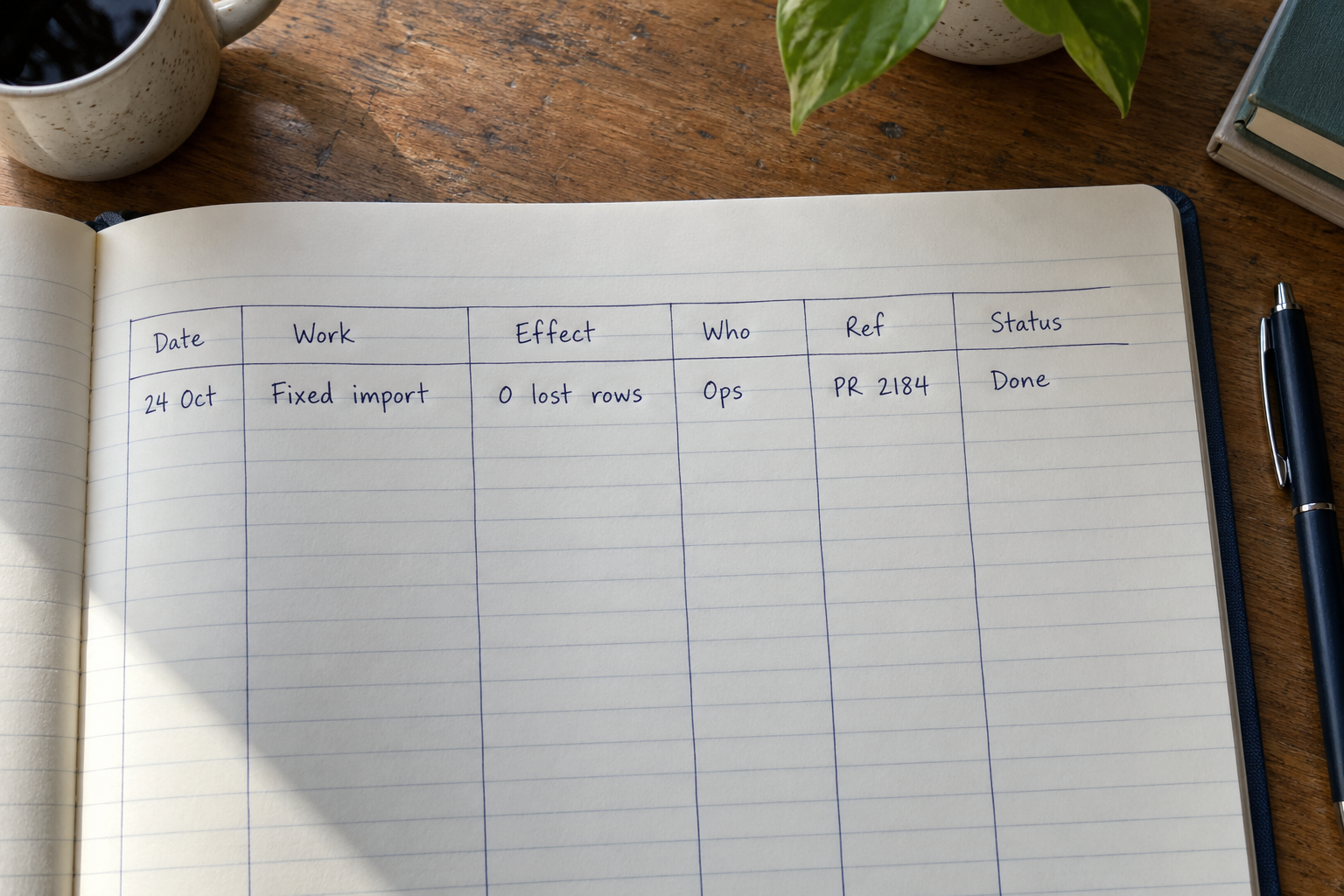
The one line, and the part everyone leaves out
Here is where most logs fail even when they are kept diligently. The entry gets written, on the day, in one line — and the line is useless.
“Fixed the import bug.” “Reviewed PRs.” “Sync with design.” “Wrote the migration script.” These are true, they are same-day, and in six months they are indistinguishable from each other and from everybody else’s. They record the activity and drop the only part that was hard to reconstruct: what the thing was costing before you touched it, and who noticed.
Compare the two versions of the same day:
Thin: “Fixed the import bug.” Useful: “Import was dropping rows on files over about 5MB — ops had been reconciling by hand each week. Patched the chunk boundary; Priya confirmed the weekly reconcile is gone. PR 2184.”
Thin: “Wrote onboarding docs.” Useful: “Wrote the environment setup doc after the third new starter in a row lost a day to it. Two people have used it since without asking anyone. Doc in the team wiki, ‘Local setup’.”
The useful version is two sentences and took under a minute, because you were not remembering it — you were living it. The costly part is the before: nobody writes down what a problem was costing once the problem is gone, and the absence of that single clause is why so much work becomes impossible to describe later.
Most work doesn’t end in a clean outcome
This is the honest problem with every neat example of a log entry, including the two above. They are tidy because they finished. A great deal of real work does not.
You spend four days investigating a reported slowdown and find nothing wrong. A project you were two months into gets cancelled above you. You do the unglamorous half of a migration and someone else lands the final piece. You spend a fortnight reviewing other people’s work, answering questions and unblocking people, and at the end of it there is nothing with your name on it.
The instinct is to skip those entries because the “what changed” field feels embarrassing. Skip them and you have a log that only records the easy quarter. Write them, and record the outcome honestly in terms of what the work actually produced:
An investigation that found nothing produced a ruled-out cause. “Four days on the checkout latency reports; traced to the client network, not our services. Ruled out the queue and the database.” That is a real result, and it is the reason nobody had to look there again.
Cancelled work still produced decisions, prototypes and knowledge. Record what was built and why it stopped, in one neutral clause: “paused when the partner integration was dropped.” A neutral note ages better than a resentful one, and you will reread this.
Work that handed off gets logged with the handoff as the outcome. “Did the schema mapping and the dry-run tooling; Sam took it from the cutover.”
Support and review weeks are the hardest to log because they are made of twenty small things. Log them as one weekly row with a count and an example, not twenty rows: “Review and unblocking week — roughly 15 PRs, plus got the new starter through their first deploy.”
“The entries you’ll be most glad you wrote are the ones for the work that produced nothing you could point at — because those are the only ones that leave no trace anywhere else.”
Where the record lives
Before anything about tools, one thing worth being clear-eyed about: a log kept on a work device or in a work account is not necessarily private to you. Company systems can be backed up, searched, inherited by whoever takes over the account, or produced in a dispute. That is not a reason to avoid keeping a log. It is a reason to keep it to a factual record of your own work, with nothing in it about colleagues, nothing you would not want read aloud, and nothing confidential that doesn’t belong outside the system it came from. A log that is boring to an outsider is exactly the right log.
With that settled, four realistic homes. A plain text file is the lowest-friction option there is — one file, one date heading per day, append a line. It costs nothing and never breaks. What you give up is filtering: finding every entry involving one team means searching rather than sorting.
A notes app is the same trade with a nicer interface and phone access, which matters if your log moment happens away from a keyboard.
A spreadsheet gives you the columns, sorts and filters properly, and is miserable to type a sentence into — which is a genuine problem when the most valuable field is a sentence.
A database-style app sits in between: defined fields, a status dropdown, a date filled in for you, and entry designed for a phone rather than a grid. Everything is still typed by hand; the structure is what you get in exchange.
If you want the fields to match the question
Pocket Tables is an iPhone app that is really a flexible personal database — the closest starting point for a work log is the project tasks template, which you can strip down to the six fields above and add a date and a status to. There is no account and the data stays on the phone, which also makes it a reasonable place for a record you would rather keep on your own device. The honest limits: every entry is typed by hand, and Pocket Tables does no integration with ticket systems or calendars, no automatic imports, no reminders, no sync, no sharing, and there is no Android version. If you want your log populated for you from the tools you already use, this is not that.
The weekly five-minute pass that stops it rotting
Same-day entries keep the log honest. A short weekly pass keeps it usable, and it is the step most people drop first.
Once a week, at a fixed time, read back over the last five days and do four things. Fill in blanks, because about a third of Thursday’s entries are missing the pointer or the name. Add outcomes that landed late — the fix you logged on Monday that someone confirmed on Friday, which is the clause you will never remember otherwise. Close out statuses, so abandoned work is marked abandoned instead of sitting ambiguously open forever. And collapse any run of near-identical rows into one with a count.
Five minutes, and it catches the week where you wrote nothing at all. An empty week is worth a single line explaining why — on vacation, on support rotation, head-down on one long thing — because a gap with no explanation reads as missing data and makes you distrust the record.
Then leave it alone. No monthly summary, no tagging pass, no quarterly reorganization. Every system for how to keep a work log that survives past the first month has exactly two moving parts, and adding a third is how you end up back in March with nothing written down.
Common questions
How long should each entry be?
One or two sentences, and treat that as a ceiling rather than a target. The constraint is what makes the habit survive a bad week. If an entry genuinely needs more room, write the long version in a document and put the document’s name in the log — the log’s job is to point at things, not to contain them.
What if I forget for two weeks?
Write one honest row covering the gap in broad strokes and start again today. Do not attempt a full reconstruction — it takes an hour, produces thin entries, and the failure usually puts people off the habit entirely. A log with holes in it is still far more useful than no log, and the holes stop mattering within a month.
Should I log small, routine tasks?
Not individually. The test is whether you would ever need to look it up again. Routine work is better logged as a weekly row with a count and one representative example, which captures the volume without burying the entries that actually need to be findable.
Is a work log different from a to-do list?
Completely, and mixing them is a common reason both stop working. A to-do list looks forward and its items disappear when done; a log looks backward and nothing is ever deleted. If you want them in one tool, keep them as two separate tables rather than two states of one table.
What about work I can’t write down in detail?
Log it at a level you are comfortable with — a date, a neutral description of your own part, and a pointer to wherever the real material lives in the system that is supposed to hold it. You lose some detail and keep the thread, which is the right trade. Anything you would not want read by someone other than you simply does not belong in the log.