
The usual version of this task is to sit down with last month’s statements and total everything up. That produces a tidy record of money that has already gone, which is a fine thing to have and completely useless for the problem most people actually have. You don’t need to know what left. You need to know what is coming, and from where, and through which door it will knock.
Almost nobody misses a bill because the money wasn’t there. They miss it because the bill arrived somewhere they weren’t looking, and nothing anywhere told them it was due.
Missing a bill is usually a visibility problem
Think about the last one that slipped. There’s a good chance it went like one of these. A paper statement came in an envelope that looked like junk and went into the pile by the door. An email landed and a rule you wrote two years ago filed it into a folder you never open. An app sent a push notification to a phone that was on silent during a meeting, and by evening it had been buried under forty other notifications. Or — the most common one by far — a yearly renewal charged itself quietly and the only announcement it ever made was at signup, eleven months earlier.
Four obligations, four different channels, and not one of them appears anywhere near the others. There is no screen you can open that lists them. The only thing holding the set together is memory, which is excellent at the three bills arriving on the same day each month and terrible at the other nine.
This is about keeping a record, not advice about money.
A list of obligations, not a log of payments
These are two different documents and it’s worth being precise about which one you’re building.
A payment log has one row per transaction. It grows forever, it looks backwards, and it answers questions about the past. A hundred rows a month, every month, and the information you need tonight is buried somewhere in the middle of it.
An obligations list has one row per recurring thing you owe. It barely grows at all. For most households it settles somewhere between fourteen and twenty-five rows and then sits there, changing two or three times a year when something starts or stops. You’re not recording events. You’re recording the standing commitments that generate the events.
That difference changes the maintenance burden from daily to almost never, and a record that needs attention twice a year is a record that still exists in November. The payment log is the thing people start in January and abandon in February. The obligations list gets finished in one sitting and then just gets consulted.
The fields that make the list work
Six columns, and one of them is doing more work than the other five combined.
What it is. In your words, not the biller’s. The line on the statement might read something like a trading name you’ve never heard of; write “the car insurance” and you’ll recognize it in a year.
Who it’s to. The actual organization. This is the field you need when you have to go find the account, change a card on file, or work out whether two confusingly similar charges are the same thing.
How much. A number if it’s fixed, the literal word “varies” if it isn’t. Resist putting an average in — a made-up precise number is worse than an honest vague one, because you’ll stop questioning it.
When. The day of the month, or for annual ones, the month. Not a full date, which goes stale. “The 14th” stays true for years.
How it gets paid. Automatic from somewhere, a card you enter by hand, a bank transfer you initiate, cash, a check. Just what is true right now, recorded as a fact.
Where it leaves from. Which account or card. This is the one that saves you when a card is replaced and you have to work out which eight things are now pointed at a dead number.
| Field | What it actually prevents |
|---|---|
| What it is | Staring at a line you can’t identify and leaving it alone because you’re not sure what it is |
| Who it’s to | Twenty minutes of searching for the account when something needs changing |
| How much | Very little, honestly — it’s the field you’ll look up anyway |
| When | Being surprised by something that has happened on the same day for three years |
| How it reaches you and gets paid | The actual failure — the statement, email or notification that arrives somewhere unwatched |
| Where it leaves from | Hunting for everything attached to a card you just replaced |
Now the part that goes against instinct. The amount is the least important field on the row. It feels like the main event — it’s a bill, bills are about amounts — but you can look an amount up in thirty seconds whenever you need it, and for the lines that vary you’d be guessing anyway. A list with every amount filled in and no channel information is still a list that lets you miss things.
The channel field is the most important one, because it’s the only field that describes where the failure happens. Write it with enough detail to act on: “paper, arrives mid-month,” “email to the old address,” “only shows in the app,” “no notice at all, just charges the card in March.” Once that column exists you can read down it and see your own blind spots lined up in a row. If four things only ever announce themselves inside apps and you have app notifications turned off, that is the whole explanation for your bill problem, visible in about four seconds.
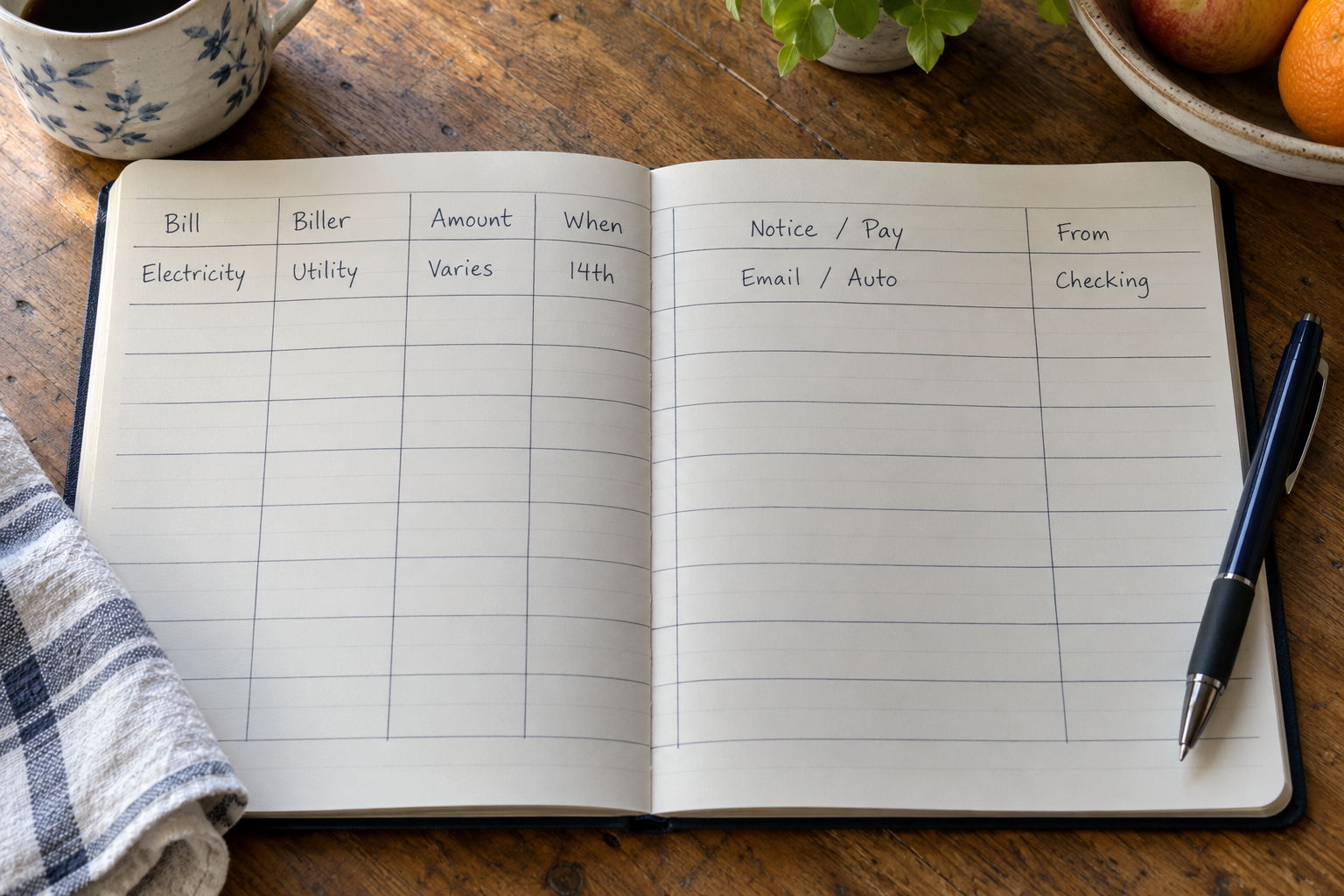
“You already know roughly what you owe. What you don’t know is which of those things is going to tell you, and which one is going to stay quiet until it’s done.”
The annual ones are where the ambushes live
Monthly bills teach you. Twelve repetitions a year is enough for a rhythm, and most people can recite their monthly set without thinking hard.
Annual obligations get one repetition. There is no rhythm, no habit, and eleven months of silence in which to forget completely. Domain and hosting renewals. An insurance premium paid yearly rather than monthly. A professional membership or license. Vehicle registration. A yearly software license. A warranty or service plan. A club or association fee. Any subscription where you chose the annual option at signup specifically because it was the better deal, and then never thought about it again.
These belong on the same list as everything else, not on a separate one, and they need one extra piece of information: the month. Not the exact date — the month is enough, and it’s the part you’ll actually remember verifying. A row that says “March, every year” is doing its job even if the real date is the 9th and you wrote nothing.
It’s worth sorting the whole list by month once you’ve built it, just to see the shape. Most people find two or three months carrying several annual lines and the rest carrying none. That’s not a problem to solve, just a thing worth knowing.
Where the record lives
The format matters less than the fields, but the options have real differences.
A calendar with recurring events is the most natural fit for the “when” problem and the worst fit for everything else. You get reminders, which is genuinely valuable, but a calendar entry is a title and a date. There’s nowhere to record which account a thing leaves from, and you cannot read the whole set as a list, which is the view that makes the patterns visible.
A paper list inside a cupboard door is better than people expect, precisely because it’s somewhere you pass daily. It doesn’t sort, it gets messy after two edits, and it isn’t with you anywhere else — but it’s the only option that never requires opening anything.
A spreadsheet is the honest default. Columns, sorting, filtering, free. The friction is that it lives on a laptop, and the moments you want to check a bill mostly aren’t laptop moments.
A notes app handles the first version fine and falls apart the moment you want to sort by month or see every line attached to one card.
A database-style app sits in between: defined columns, phone-shaped entry, sorting and filtering by field. Everything gets typed by hand, which for a list of twenty rows that changes twice a year is not much of a cost.
If you want the columns on your phone
Pocket Tables is an iPhone app that’s really a flexible personal database. The closest starting point for this is the monthly budget template, which already has the recurring-lines structure — rename the columns to the six above, add a channel field, and delete whatever you don’t want. Being straight about the limits: Pocket Tables is a table you type into. It does not connect to any account, import statements, detect charges, send you reminders, sync between devices or share with anyone else, and there’s no Android version. If you want something that watches your accounts for you, this is the wrong tool. If you want one list you control, with the fields you chose, it does that.
The review that actually finds something
Once a quarter, read down the list. It takes five minutes because there are twenty rows, and you’re looking for exactly three things.
The line you stopped using. This is the one. Somewhere in the list is a thing you are still paying for and no longer use — a service you switched away from and never cancelled, a storage tier you needed during one move, a membership attached to a hobby you dropped, a tool you signed up for during a project that ended last spring. These are invisible in a payment log, where a small recurring charge looks like every other small recurring charge. They’re obvious on an obligations list, which is short enough to read and uses names you wrote yourself. Ask each row: did I use this in the last three months? Most people find at least one.
The rows that have drifted. Anything you marked “varies” is worth a glance, and so is anything whose channel has changed — an account that moved from paper to email-only, a service that stopped sending notices.
The rows that should be gone. Things you genuinely ended. Delete them. A list carrying obligations that no longer exist is a list you stop trusting, and the moment you stop trusting it you stop reading it.
That’s the whole routine. Four times a year, five minutes, plus adding a row whenever you sign up for something new — the one habit worth forming, because a row added at signup costs nothing and a row reconstructed eleven months later costs an afternoon.
Common questions
How often does this list need updating?
Far less often than people assume. The rows represent standing commitments, not transactions, so nothing changes until you start or stop something. Add a row when you sign up for anything recurring, delete one when you end it, and read the whole thing through once a quarter. That’s it.
Do I need to record the amount at all?
Only loosely. A fixed amount is worth writing down because it costs nothing, and the word “varies” is worth writing down because it tells you not to trust a number you half-remember. What isn’t worth it is maintaining amounts as they change — you’ll fall behind, and a stale number in a column reads as current, which is worse than a blank.
What about bills that change every month?
Record them like everything else, with “varies” in the amount column. The row exists for the date and the channel, not the figure. A utility that lands anywhere in a range is still something you want listed on the 20th, and the exact number is there when you need it.
Should this just live on a calendar instead?
A calendar is good at reminding and bad at listing. If reminders are the thing you’re missing, there’s no reason not to have both — recurring calendar entries for the dates, and the list for everything a calendar entry can’t hold. What a calendar can’t give you is the single readable view of every obligation at once, which is where the patterns and the forgotten lines turn up.
What about things someone else in the household handles?
Put them on the list with a column for who owns the row. The point is completeness — a list covering two-thirds of the obligations still can’t answer “what’s due this month” without asking someone. If the other person keeps their own list, one shared read-down a quarter usually keeps both current.