
Open almost any freelancer’s client list and you’ll find a contact card wearing a spreadsheet’s clothes: name, email, company, agreed rate. Four columns, three of which your phone’s address book already holds, and one you could recite from memory anyway.
That list has never once saved anyone money. The expensive things are the ones that never got written down: this client is net 30 on paper and fifty-something days in practice, that one’s “one quick revision” turns into four rounds every single time, and the big one can only be invoiced through a portal that wants a purchase order number nobody passed along. You learned all of that the hard way. Then you didn’t record it, so you’ll learn it the hard way again.
A contact card is not a client record
The difference is what the thing is for. A contact card is for reaching someone. A client record is for making a decision — whether to take the next job, what schedule to put on it, and what to have ready before the first call.
Those decisions don’t need an address. They need history. And the history lives in your head, where it decays in a specific and costly pattern: the sharp details go first and the vague feeling stays. Six months later all you’ve kept is “that one was a bit of a slog,” which is useless, because it doesn’t tell you whether the slog was the brief, the approvals, the payment, or the three extra calls.
Write the slog down in parts and it stops being a mood and becomes something you can plan around: a longer timeline for the client whose approvals take two weeks, the invoice paperwork started early for the one with the portal, and an end to being surprised by the same thing four times.
What you’re actually asking before you say yes
Before you fix the record, notice what you’re really doing when a familiar name lands in your inbox. You’re running a short set of checks, badly, from memory. Each one maps to a field.
| The question in your head | The field that answers it |
|---|---|
| “When does the money actually arrive — not when is it due?” | Invoice sent date and payment received date, on every past invoice |
| “Is ‘one round of revisions’ a real number here?” | Rounds agreed versus rounds actually used, last two jobs |
| “Where does the invoice even go?” | Billing route — portal, shared inbox, named person — plus any reference or PO number |
| “Who says yes, and who only thinks they do?” | Approver, kept separate from your day-to-day contact |
| “How much unpaid time does this one eat?” | Hours on calls, scoping and chasing, logged outside the deliverable |
| “What did we agree, and where is that written down?” | Agreed figure, agreed dates, and a pointer to the document that says so |
Six fields, and not one of them is a phone number. That’s the whole shift: every one is a working fact about how the job goes, recorded once, by the only person who’ll ever see it.
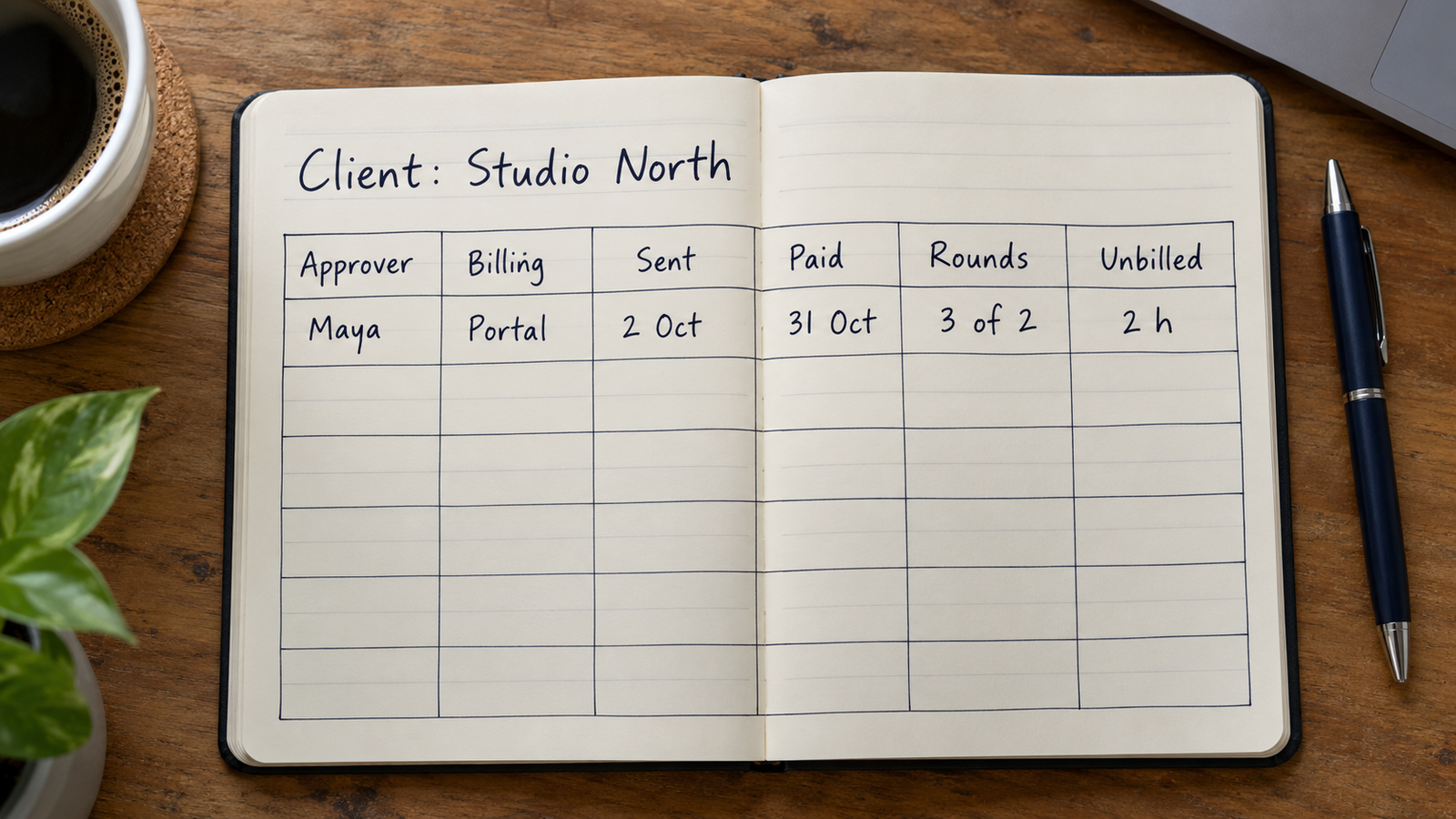
The fields that earn their place
Two contacts, not one. The person you email daily and the person who approves work are often different humans, and conflating them is how a project sits still for nine days. Keep both, and keep a note on how the approver prefers to receive things — in a call, in a shared document, as a single PDF. That one line removes an entire round trip.
The billing route. This is the most boring field and probably the highest-value one. Some clients pay a PDF emailed to a person. Some need it uploaded to a vendor portal with a reference number issued weeks earlier. Some want it split across two departments. Record the exact path, including the login or reference number’s location, and the thing you currently rediscover every quarter becomes a thirty-second task.
Invoice dates, both of them. Sent and received. Not the terms — the terms are what was agreed, and you want to know what happened. Two or three invoices in and you have the real gap, in days, for that specific client. It is almost never the number on the invoice.
Revision rounds used. Write down what was agreed and what actually occurred. A client who reliably needs three passes isn’t a problem; a client you keep quoting as if they need one is. The field turns a recurring irritation into a number you can plan a calendar around.
Unbilled time. Calls, scoping, writing the proposal, the Friday afternoon where you answered seven questions. Most freelancers track only billable hours, which means the clients who consume the most time look identical to the ones who don’t. You don’t need precision here. “Roughly four hours of calls on a two-day job” is enough to be informative.
Scope drift notes. The specific thing each client always asks for at the end — source files, an extra format, a small additional deliverable “while you’re in there.” Written down, it becomes something you can include deliberately next time, or name explicitly as outside the work, before anyone is annoyed.
Where they came from. Referral, old colleague, a directory, a cold email. After a year or two this column quietly tells you which source produces clients you want more of, which is the only marketing data most freelancers ever actually need.
The money fields: the agreed number, the dates, and nothing else
There’s a trap here worth naming. The moment money enters a record, people start trying to make the record give advice — what to charge, who to drop, what to do about the one who’s late. That’s not what it’s for, and a spreadsheet is a bad place to reason about any of it.
The money fields have a much smaller job: hold the figure you and the client agreed, hold the dates attached to it, and point to the document where that agreement is written. Agreed amount. Agreed schedule — deposit, milestones, final, whatever was actually set. Invoice sent. Invoice paid. The location of the email or signed file that confirms it. That’s the lot.
Kept that way, the fields are purely factual, and their value is that they’re not reconstructed under pressure. When you need to know what was agreed in March, you look it up instead of scrolling a thread. When you’re planning your own month, you use the real payment gaps rather than the optimistic ones. The record holds the facts. What you do with them is a judgement call, and it stays yours.
One more boundary, and it’s the important one. Everything above is a working fact about a job: how the work moves, how the paperwork moves, what was agreed. None of it is a character profile. It’s tempting, after a difficult month, to start writing down impressions of people — who’s difficult, who’s disorganised, what you heard about their company. Don’t. It isn’t useful for the decision you’re making, it ages badly, and the moment a record stops being about the work it stops being something you’d be comfortable having open on your screen in a call.
“The test for any field is simple: would it change what I do on the next job? If not, it isn’t a client record. It’s a note about a person, and it doesn’t belong there.”
Applied honestly, that test keeps the revision rounds and the portal reference numbers. It drops “seemed stressed on the call.”
Where the record lives
The fields matter more than the tool, but the tool decides whether the fields exist at all.
Invoicing and accounting software already holds half of this, and holds it well — amounts, invoice dates, payment dates, often an automatic record of when things cleared. What it generally won’t hold is the soft operational stuff: revision rounds, the approver’s preferences, the thing they always ask for at the end. Those don’t fit its data model, so they end up in a memo field you can’t sort.
A CRM is built for a different shape of work. It assumes a pipeline — leads, stages, deals, follow-ups — and a freelancer with eleven clients, four of them dormant, is mostly managing relationships rather than moving prospects through a funnel. You can bend one to fit. Most people bend it once and stop opening it.
A spreadsheet is free and will do everything described here, which is why so many freelancers end up with one. The catch is where you’d want it: pleasant on a laptop, genuinely awkward on a phone — and a lot of the useful moments, like a reference number mentioned on a call, happen away from the desk.
A general-purpose database app sits in between. You define the columns yourself, so revision rounds and billing routes get to be real fields you can sort and filter, and entry is phone-shaped. The trade is that everything is typed in by hand and nothing is automated.
If you’d rather define the columns yourself
These fields come set up in the client record template for Pocket Tables, an iPhone app that’s really a flexible personal database — start from the template, then add or delete fields until the table matches how your work actually runs. Being straight about the trade: every row is typed in by hand. Pocket Tables doesn’t send invoices, doesn’t connect to your bank or your accounting software, won’t chase anything or notify you about anything, has no sync or sharing, and there’s no Android version. If you want invoicing and payment tracking handled automatically, dedicated invoicing software is the better tool. This is for the operational half that doesn’t fit anywhere else.
Keeping it current without it becoming a second job
A client record only needs updating at a handful of moments, and all of them are moments you’re already stopped.
When a job is agreed, write the figure, the dates and where the agreement lives. Two minutes, while the email is still open. When you send an invoice, write the date. When the money lands, write that date too — the five-second habit that produces the most useful number in the record. When a job finishes, spend three minutes on a close-out: rounds used, roughly how much unpaid time went in, and anything that surprised you. Three minutes at the end of a two-week project is not overhead.
Then, perhaps twice a year, read the whole thing. Mark the dormant clients dormant so your list stops implying you have fourteen active ones. Delete anything that turned out not to matter. And read the close-out notes as a set, not one by one: the pattern across five clients is where you notice whether the jobs you enjoy and the jobs that pay on time are the same jobs.
Accuracy isn’t the standard. A record that’s mostly right and still open beats an immaculate one you abandoned in February.
Common questions
Is this worth doing for a one-off job?
Record two things and skip the rest: the agreed figure with its dates, and where that agreement is written. One-off clients have a habit of reappearing eighteen months later as if no time has passed, and those two fields are the ones you’ll wish you had. The operational notes only pay off across repeat work.
I already use invoicing software. Isn’t this duplicated?
Partly, and you should let the invoicing tool own what it’s good at — amounts, invoice dates, payment dates. What it won’t give you is a sortable field for revision rounds, a note on how the approver wants work delivered, or the reference number their portal needs. Keep the money in the money tool and the operational record alongside it.
What do I actually do with the payment-gap number?
Mostly you plan around it. Knowing that one client’s money reliably arrives several weeks after the invoice changes how you sequence work and when you expect to be paid, and it’s useful context when you’re deciding whether to take on their next project. It’s a planning input about your own schedule, not a verdict on the client.
Should I write notes about the people, not just the work?
Keep it to things that change how you do the job: the approver prefers a call to a document, the main contact is offline on Fridays, this team works in a different time zone. Those are working facts and they save real time. Impressions of someone’s personality or situation aren’t, and a record full of them is one you’ll be reluctant to open in front of anyone.
How does this work for clients who come through an agency or a platform?
Record the agency as the client, since that’s who sets the terms and sends the money, and keep the end client as a field on the job rather than a row of its own. The fields that matter most shift slightly: the billing route and the approval chain get more important, because both usually run through someone who isn’t the person reviewing your work.