The first thing almost everyone does is write the list. Book the venue, send the invitations, sort the food, order a cake, make a playlist. It feels like progress, and for about a week it is. Then the list quietly stops being opened — not because anything on it was wrong, but because it answers a question you no longer have. You already know a cake is involved.
What actually goes wrong at a fortieth birthday, a thirty-person wedding, a two-day team offsite or a family reunion is almost never a forgotten task. It’s the seam between two of them. The caterer who said “sure, we can do forty” on a phone call nobody wrote down. The second payment that was due on the 14th and is now the 19th. The DJ who is confirmed in your head and penciled in his. Tasks are visible; commitments are not, and commitments are what the event is made of.
Why the checklist stops working
A task list has one state per row: done or not done. That’s enough for things you control entirely. Buy candles. Print the seating cards. Make the playlist. You can look at the row and know the answer.
Almost nothing else in an event looks like that. “Catering” isn’t done or not done. It’s a chain: you’ve found someone, they’ve quoted, you’ve agreed a menu, you’ve paid something, you’ve given them a headcount, they’ve confirmed an arrival time. Any of those can be half-finished, and one checkbox flattens six states into one that’s always a little bit of a lie.
So you stop trusting it, and the real plan moves into your head and your sent-mail folder. It stays there until the week of the event, when you spend two evenings reconstructing it from email threads.
The fix isn’t a better checklist. It’s a second, much smaller record built around the three things that can genuinely hurt you: who agreed to what, what date is coming, and what money is already spoken for.
The three columns that earn their keep
Here’s the test for whether a field deserves to exist: at some point in the next eight weeks you’ll be standing in a kitchen with a phone in your hand and a vendor asking you something. Does the field answer a question you’ll be asked, or one you’ll ask yourself at 11pm on a Tuesday? Run that over everything an event generates and the same handful of columns survive.
| The question you’ll actually have | The column that answers it |
|---|---|
| “Is the photographer booked, or did I just email her?” | Status, plus the date you last heard back |
| “What did they say they’d bring?” | One line on what’s included, in their words |
| “How much of the budget is actually still mine?” | Committed total, and paid so far |
| “Is anything due this week?” | Next date, with what it is |
| “When do I have to give the caterer a final number?” | Deadline, and what it depends on |
| “Who do I call when the van hasn’t arrived?” | A human name and a mobile number |
Six columns, and they collapse into three groups: vendors, dates, money. A task list is welcome to exist alongside them. It just isn’t the document that saves you.
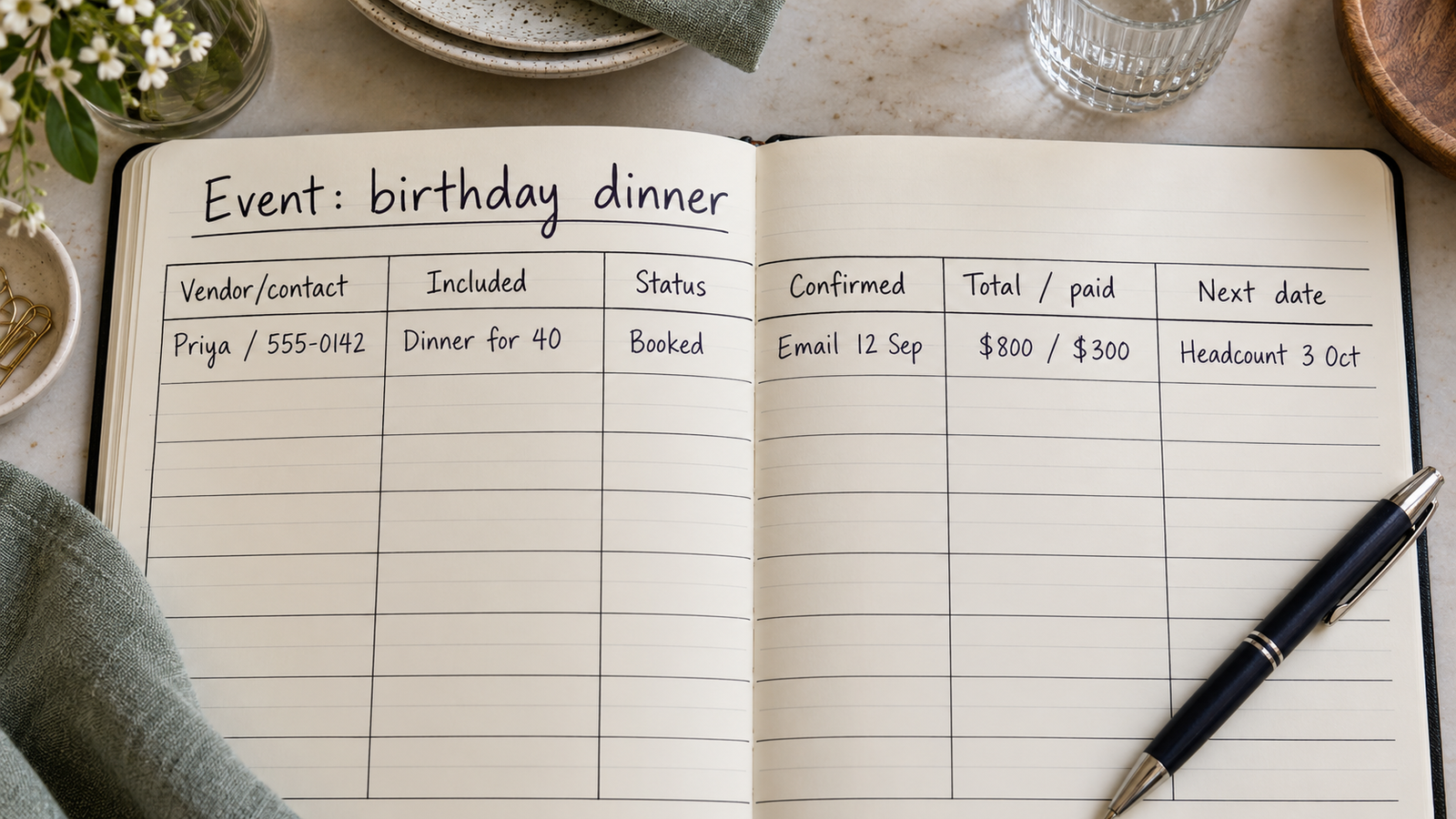
A vendor row is a record of who confirmed what
Give every outside party a row, and be generous about what counts as a vendor: the venue, the caterer, the florist, the photographer, the person with the van, the cousin bringing the speakers, the hotel holding ten rooms. If someone outside your household has to do something on the day, they get a row.
What goes in the row is narrower than you’d expect. A name you’d recognize, what they’re providing in one line, and a human contact — the person’s mobile, not the general enquiries address, because nobody answers that on the morning of the event. Then the two fields that do the real work.
Status, as a word rather than a checkbox. Four values cover nearly everything: enquired, quoted, booked, done. The useful one is the gap between quoted and booked, where every unpleasant surprise lives. A vendor you’ve had a lovely conversation with and a vendor who has you in their calendar look identical in your memory and are not remotely the same thing.
Last confirmed, as a date and a channel. Not “confirmed: yes.” Write “confirmed by email, Sep 12” or “texted Sep 12, said 7am setup.” The date matters because a confirmation from six weeks ago is worth re-checking and one from Tuesday isn’t. The channel matters because it tells you where to go and look when the detail turns out to be ambiguous.
If there’s paperwork — a booking form, a signed quote, a hire agreement — the record’s job is not to interpret it. Store three things: the dates it commits you to, the amounts it commits you to, and where the document itself is, in plain words. “Signed PDF in email from Hartley Hall, Aug 3.” That’s the whole entry. When a question about the terms comes up, you want the actual document in front of you, or the vendor on the phone — not a summary you typed in a hurry four months ago.
Deadlines only count when they have a date and a dependency
“Finalize catering” is not a deadline. “Final headcount to Priya by Oct 3” is. The difference is that the second one can be looked at on October 1st and acted on, and the first one can only be worried about.
Every date worth recording has two parts: the date itself, and what it’s waiting on. That second part is the one everyone leaves out, and it’s where the week-before panic comes from. A real example of the shape: the caterer wants a final number on the 3rd. You can’t give a final number until RSVPs close, so RSVPs close on the 1st. People don’t reply to invitations instantly, so invitations go out five or six weeks before that. Three dates, one chain, and the only one anybody else told you about was the first.
Work backwards from each fixed date and write down what it forces. A headcount deadline forces an RSVP cut-off, which forces an invitation date. A venue access window forces a delivery time, which forces a confirmation call to whoever is delivering. Most dates in an event aren’t chosen by you; they’re consequences of a date somebody else owns.
Two small fields make the list usable. One is whose move it is — yours or theirs — because the ones waiting on someone else need a nudge, not work. The other is what happens if it slips, in a few words: “they’ll cater for 40 regardless,” “room block releases,” “no change, just annoying.” Without that, the date that genuinely can’t move gets the same attention as the one that can.
Money: committed is not the same as paid
Most event budgets are written once, before anything is booked, as a column of estimates. The number you need for the next three months is a different one: not what you planned to spend, but what you’ve already promised.
Three figures per vendor is enough. The agreed total, the amount paid so far, and the next payment with its date. Subtract paid from agreed and you have what’s still coming; add the agreed totals and you have the number that actually constrains the rest of the planning. Estimates tell you what an event might cost. Committed tells you what it will cost unless you change something, which is the only version that helps when your sister suggests a string quartet.
The next-payment date is the field most likely to save you something. Payments scattered across eight vendors over four months do not stay in anyone’s head, and the reminder, if there is one, arrives in a thread you’ve stopped reading. One sortable date column turns that into a thirty-second check on a Sunday.
“Nobody loses control of an event budget in one decision. They lose it by never once seeing all the committed numbers in the same place at the same time.”
Keep per-head costs separate from fixed ones. Catering, drinks and favors move with the guest count; the venue, photographer and van don’t. When someone asks whether you can squeeze in four more people, that split is the difference between an answer and a guess.
Where the record lives, and the version you carry on the day
Four realistic homes for this, and the choice mostly comes down to where you’ll be standing when you need to update it.
A spreadsheet is free, sorts and filters properly, and handles the money arithmetic for you. It’s also miserable to edit one-handed on a phone while a florist is talking, which is exactly when the information arrives. Plenty of people split the difference: enter at a laptop, consult on a phone.
A notes app is where most people start and it works fine for a small party. It stops working the moment you want to ask it a question — what’s due next, what’s still unconfirmed — because a note can be read but not sorted.
Dedicated planning apps, especially the wedding ones, arrive with a checklist, guest list and budget already built. If their structure matches your event, that’s a real head start. If it doesn’t — an offsite, a reunion — you end up fighting fields you can’t remove.
Database-style apps sit in between: you define the columns, entry is phone-shaped, and you can sort by next payment or filter to everything still unconfirmed. Everything is typed in by hand, which is the trade.
Whatever holds it, the day itself needs a derived version. A single page ordered by time: 8am venue access, 9:30 chairs arrive, 11am florist, 12 doors, each line with a name and a mobile number. It’s a view of the vendor table, not a new document — if the run sheet becomes its own source of truth, the two disagree by Thursday and you’ll believe the wrong one.
One habit holds the whole thing together: update during the call, not after it. The sentence “I’ll write that down in a minute” is where the plan goes to die. Thirty seconds while they’re still on the line, in their words, with today’s date.
If you’d rather own the columns
These fields come set up in the event planner template, built for Pocket Tables — an iPhone app that’s really a flexible personal database, so you start from the template and then add or delete fields until the table matches your event. Worth being straight about the trade: everything is typed in by hand. It won’t chase RSVPs, email your vendors, remind you about a payment, sync between devices or share the plan with anyone else, and there’s no Android version. If you want a planner that runs the guest list for you, a dedicated event app is the more convenient tool. This is for people who’d rather define the fields themselves and keep the data on the phone.
Common questions
How far ahead do I need to start writing this down?
From the first enquiry, not the first booking. The enquiry stage is precisely when you have five half-conversations with venues and no memory of which one quoted what. Three rows with a status of “enquired” costs you two minutes and prevents the most common early mess.
Do I need a separate budget sheet as well?
Usually not. If the money lives in the vendor rows — agreed, paid, next payment — the totals come out of the same table you’re already maintaining. A separate budget document tends to drift from reality within a fortnight, because you update the one you’re already in and forget the other.
What about vendors who only ever talk on the phone?
Write the call down immediately afterwards in their words, with the date, and send a short email repeating the details back. The email isn’t a formality; it’s how an arrangement you both remember differently gets caught in week two rather than on the morning.
How do I track RSVPs without it swallowing everything?
Keep guests in their own table, separate from vendors, and resist adding columns. Name, how you invited them, reply, number of people, dietary note. That’s enough to produce the one output you need, which is a final headcount on a specific date.
Is a work offsite different from a party?
The columns are the same; the pressure moves. An offsite has more date dependencies — travel, rooms, a session plan that depends on who’s coming — and usually one approval step you don’t control. Record that approval as a row with its own status, because waiting on a sign-off behaves exactly like waiting on a vendor.